
SINGLE SIGN-ON FOR MFPS
One sign-in for everything the MFP does
Bring the identity your organization already manages to the multifunction device.
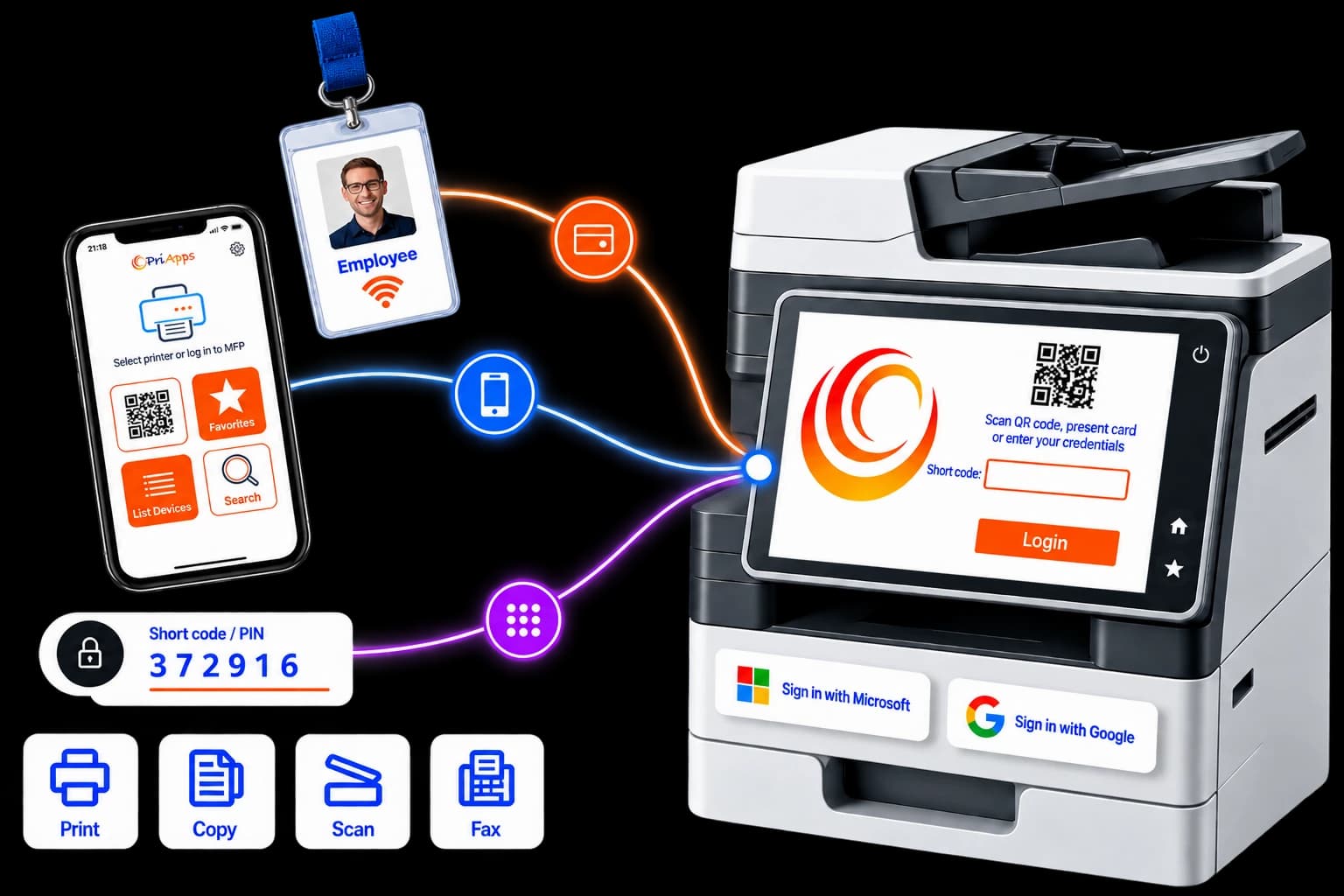
With PriApps, users authenticate once at a supported MFP — using their staff ID or access badge, a shortcode or PIN, network credentials, or the PriApps Touch-Free smartphone app. PriApps associates that authentication with the user’s organizational identity and applies the access, permissions and workflows that belong to them.
From that single sign-in, the user can release print jobs and access the copy, scan and fax functions they are authorized to use.
The MFP becomes part of your identity and access environment rather than an anonymous shared device — without giving users another password to remember.
THE PROBLEM
The MFP is often the one device anyone can just walk up to
Your organization already puts identity behind its computers, email, applications and cloud services. Users authenticate, access is granted according to their role, and activity can be associated with a person.
The problem
Shared multifunction devices can sit outside that model.
Without user authentication, someone can walk up to an MFP and potentially copy documents, scan information to external destinations, use color and other costly functions or access fax services — without the device necessarily knowing who they are.
That creates a gap between the security controls applied to your digital systems and those applied to the devices handling the documents themselves.
PriApps Single Sign-On closes that gap.
What PriApps does
The user authenticates at the device and PriApps identifies who they are, applies the permissions and policies associated with them, presents their personal print and scan workflows, and records supported activity against their identity.
And users can authenticate with credentials they already have — such as their staff badge, door-access card, shortcode or PIN, network credentials or smartphone.
Nothing new to issue. Nothing new to memorize.
MORE THAN A LOCK SCREEN
Authentication that does more than unlock the panel
Put an identity on activity at the device
Print release, copy, scan and fax activity on supported devices can be associated with the authenticated user. Document activity no longer has to be anonymous simply because it happened at a shared machine.
Control what each person can do
Grant access to device functions according to the user's role, group or individual permissions. Restrict color, limit scan destinations, control access to fax services and determine which functions are available to each user.
Use the identity you already manage
PriApps connects authentication at the device with the user identities your organization already maintains. Staff badges, shortcodes or PINs, network credentials and smartphone authentication can be associated with users managed through systems such as Microsoft Entra ID and other supported identity and directory services.
Personalize the device to the user
Once authenticated, the user can see what belongs to them — including held print jobs in PriApps myQueue, Personalized Scan Workflows and the device functions they are permitted to use. Less hunting. Fewer errors. Less training.
Account for activity at the device
Supported authenticated activity can be recorded by user, device and department, providing useful information for security reviews, compliance, cost allocation and reporting.
HOW IT WORKS
One sign-in, then the panel adapts to the user
Approach
The user walks up to a supported multifunction device running the embedded PriApps interface.
Authenticate
They identify themselves using a staff ID or access badge, shortcode or PIN, network credentials, supported identity-provider authentication or the PriApps Touch-Free smartphone app.
Identify
PriApps associates the authentication with the user's organizational identity and retrieves the permissions and policies that apply to them.
Personalize
The panel presents the user's held print jobs in myQueue, Personalized Scan Workflows and the device functions they are permitted to use.
Work
With one sign-in, the user can release print jobs, copy, scan and — on supported devices — access integrated fax services without authenticating separately for each function.
Record
PriApps records supported activity against the authenticated user, device and department for reporting, auditing and cost allocation.
ONE IDENTITY, EVERY FUNCTION
Sign in once. Print, copy, scan and fax.
On a supported MFP, a single authentication can govern the user’s interaction with the device.
They do not need to authenticate to release a print job, authenticate again to copy and then enter another code to scan.
One identity, verified once, determines which functions, workflows and documents that person can access.
That distinction matters to users.
Authentication that simply puts another login screen in front of the copier creates friction. Authentication that immediately gives users their held print jobs, their Personalized Scan Workflows and the functions they are authorized to use makes the MFP faster and easier to use while improving security.
One identity, verified once, determines which functions, workflows and documents that person can access.
FLEET COVERAGE
Authentication that adapts to the device
The full embedded Single Sign-On experience — including identity-based access to copy, scan and fax — requires a supported MFP capable of running the PriApps embedded interface.
Real printer fleets also contain single-function printers, older devices and models that cannot host an embedded PriApps application.
PriApps supports any make or model of printer and MFP, and offers enhanced support for an increasing number of smart SFPs and MFPs where deeper integration is available. The authentication and release experience adapts to the capabilities of each device.
- On a supported MFP — users authenticate through the embedded PriApps interface and a single identity can govern secure print release and permitted copy, scan and fax functions.
- On other supported printers and devices — secure print release can still be provided using the authentication and release methods available for that device and deployment, including PriApps Touch-Free or a release station.
This lets organizations provide deeper identity integration where the device supports it while continuing to manage printers that do not provide an embedded application platform.
You do not have to replace working equipment or standardize every location on a single device manufacturer simply to introduce a consistent authentication strategy.
Explore device compatibility →
Related solution: Secure Print Release
USE THE CREDENTIALS PEOPLE ALREADY HAVE
Authentication that fits your environment
PriApps supports different authentication methods because different environments — and different users within the same organization — have different requirements.
Options include:
Existing staff badges can therefore become more than door-access credentials. PriApps can associate the badge presented at the MFP with the user’s managed identity and apply the appropriate device permissions and workflows.
You can also combine authentication methods across the organization — badges for office staff, shortcodes or PINs in another environment, network credentials where appropriate and Touch-Free for users who prefer to authenticate from their own smartphone.
Whichever method is used, the objective is the same: identify the user once and apply that identity across the functions available to them.
Related solution: Contactless workflows
PERMISSION-BASED ACCESS
Not everyone should be able to do everything
A shared device can appear to treat every person standing in front of it the same.
Once PriApps knows who the user is, it doesn’t have to.
Permissions can be assigned according to user, group, department or role.
With permission-based access you can:
- Restrict color printing and copying to approved users or groups
- Limit scanning to approved destinations and workflows
- Control who can access integrated fax services
- Grant or withhold specific MFP functions
- Apply policies consistently across supported devices
- Manage permissions centrally rather than configuring individual users at individual MFPs
The device hasn’t changed. The user has.
Permitted at MFP-04
Access follows Sarah's role.
- ✓ Copy
- ✓ Color
- ✓ Scan
- — Fax
Permitted at MFP-04
Same device, a different role.
- ✓ Copy
- — Color
- ✓ Scan
- ✓ Fax
Access follows the person rather than the machine.
When a user authenticates at another supported MFP, PriApps can apply the permissions and workflows associated with that user there too.

RELEASE AND SIGN IN FROM A SMARTPHONE
Put authentication in the user's own hands
A card reader or MFP control panel does not have to be the only way users authenticate.
PriApps Touch-Free lets users interact with supported print, copy, scan and fax workflows from their own iOS or Android smartphone.
Users authenticate through the PriApps app and can access the documents and workflows that belong to them without repeatedly entering credentials into a shared device.
Touch-Free also provides another way to release held print jobs on devices where an embedded PriApps interface or card-reader experience is not available.
The result is a consistent PriApps experience that can extend beyond the MFP control panel itself.
Related solution: Contactless workflows
VISIBILITY
Activity attributed to a person
Authentication provides more than access control. It gives activity at the MFP an identity.
PriApps can associate supported print-release, copy, scan and fax activity with the person who authenticated, together with information such as the device, department and time of the activity.
These records can support:
- Security investigations
- Compliance reviews
- Departmental reporting
- Cost allocation and chargeback
- Usage analysis
- Sustainability initiatives
Administrators can centrally manage users, authentication methods, permissions and device policies instead of managing each MFP independently.
Related capability: Usage tracking and reporting
Activity log
SECURITY
Security that reaches the device itself
Organizations increasingly apply strong identity controls to computers, applications and cloud services. Shared printers and multifunction devices should be part of that strategy too.
PriApps extends identity and access control to supported MFPs and connects device activity with the users your organization already manages.
Alongside authentication at the panel, the wider PriApps platform can provide:
Role-based access to supported device functions
Secure print release, holding documents until an authorized user releases them
Print rules and document-handling policies
Personalized and auditable scan workflows
Controlled delivery to approved destinations
Controlled access to integrated fax services
Integration with identity providers and access-card systems
Detailed activity records across supported workflows
Together, these capabilities bring the MFP into the same identity and document-security strategy as the rest of your environment.
Related capability: Security and Identity
PRODUCTS
Which PriApps product delivers this
Single Sign-On for MFPs is available through several PriApps products. The right option depends on your printer fleet, identity environment and preferred deployment model.
PriApps SSO
Dedicated Single Sign-On and permission-based access at the MFP control panel, with secure print release included.
On-premises · Hybrid
Learn more →
PriApps CloudPrint
Cloud-native print management with MFP authentication and secure print release, including printing from Chromebooks.
Cloud-native
Learn more →
PriApps for Microsoft 365
MFP Single Sign-On for Microsoft 365 and Universal Print environments, connecting printing and MFP access with the identities you already manage.
On-premises · Hybrid · Cloud-native
Learn more →
A PriApps specialist can assess your fleet and identity environment and recommend the appropriate configuration.
Related capability: Deployment options
WHY PRIAPPS
What sets PriApps apart at the MFP
Identity at the device
Extend the identities your organization already manages to supported printers and MFPs.
One sign-in for the whole panel
Secure print release, copy, scan and fax under a single authentication on supported MFPs.
Access by role, not by machine
Permission-based control that follows the user across supported devices.
Authentication that fits
Staff badges, shortcodes and PINs, network credentials, smartphones and integration with identity systems such as Microsoft Entra ID.
Part of a broader document workflow platform
Connect Single Sign-On with secure print release, print management, cost control, reporting and Personalized Scan Workflows.
Deployment choice
On-premises, hybrid or cloud-native — matched to your infrastructure and requirements.
Specialists, not a ticket queue
People who understand printers, MFPs, networks and identity systems and take ownership of resolving the problem.
Frequently asked questions
What is Single Sign-On for MFPs?
It lets a user authenticate once at a supported multifunction device and use that identity for secure print release and the copy, scan and fax functions they are permitted to access.
How do users sign in?
Depending on the deployment, users can authenticate with staff ID or access badges, shortcodes or PINs, network credentials, supported identity-provider authentication or the PriApps Touch-Free smartphone app.
Can we use our existing staff ID or door-access badges?
Yes. Existing proximity and access cards can be associated with the user's organizational identity so the same badge used for physical access can also identify them at a supported MFP.
Does PriApps integrate with Microsoft Entra ID?
PriApps can integrate MFP authentication with identities managed through Microsoft Entra ID and other supported identity and directory systems, allowing device access and permissions to be linked to the identities your organization already manages.
Does one sign-in really cover copy, scan and fax?
On supported MFPs, yes. A single authentication can govern the print-release, copy, scan and fax functions that the user is permitted to access rather than requiring a separate login for each.
Can we control what each person is allowed to do?
Yes. Permission-based access can determine which functions a user, group or role can access — for example restricting color, limiting scan destinations or controlling access to fax services.
Do all our devices need to be the same brand?
No. PriApps is designed for mixed printer and MFP fleets. Embedded Single Sign-On is available on supported devices, with other authentication and secure-release options available according to device capabilities and deployment.
What about printers that cannot run an embedded application?
They cannot provide the same embedded MFP experience, but secure print release can still be available through supported alternative release methods such as PriApps Touch-Free or a release station.
Do users need another password?
Not necessarily. PriApps is designed to use authentication methods and identities the organization already provides, such as staff badges, network credentials, PINs or smartphone authentication.
Is MFP Single Sign-On available in the cloud?
Yes. PriApps CloudPrint provides cloud-native MFP authentication and secure release, while PriApps for Microsoft 365 supports on-premises, hybrid and cloud-native deployment.
Can we see who used the device?
Yes. PriApps can associate supported print-release, copy, scan and fax activity with the authenticated user, device and department for reporting, auditing and cost allocation.
Bring the MFP inside your identity system
Give users one authentication for the device — and give your organization greater control over who can do what and visibility into the activity that follows.
PriApps specialists can assess your existing devices, authentication requirements and identity environment — including Microsoft Entra ID, staff access cards and other existing credentials — and recommend a Single Sign-On configuration designed around them.