SCANNING & DOCUMENT CAPTURE
Capture at the MFP — and your document arrives exactly where it belongs
PriApps Personalized Scan Workflows turn a scan at a supported multifunction device into a controlled, personalized digital document — routed to the right destination, delivered securely, and recorded.
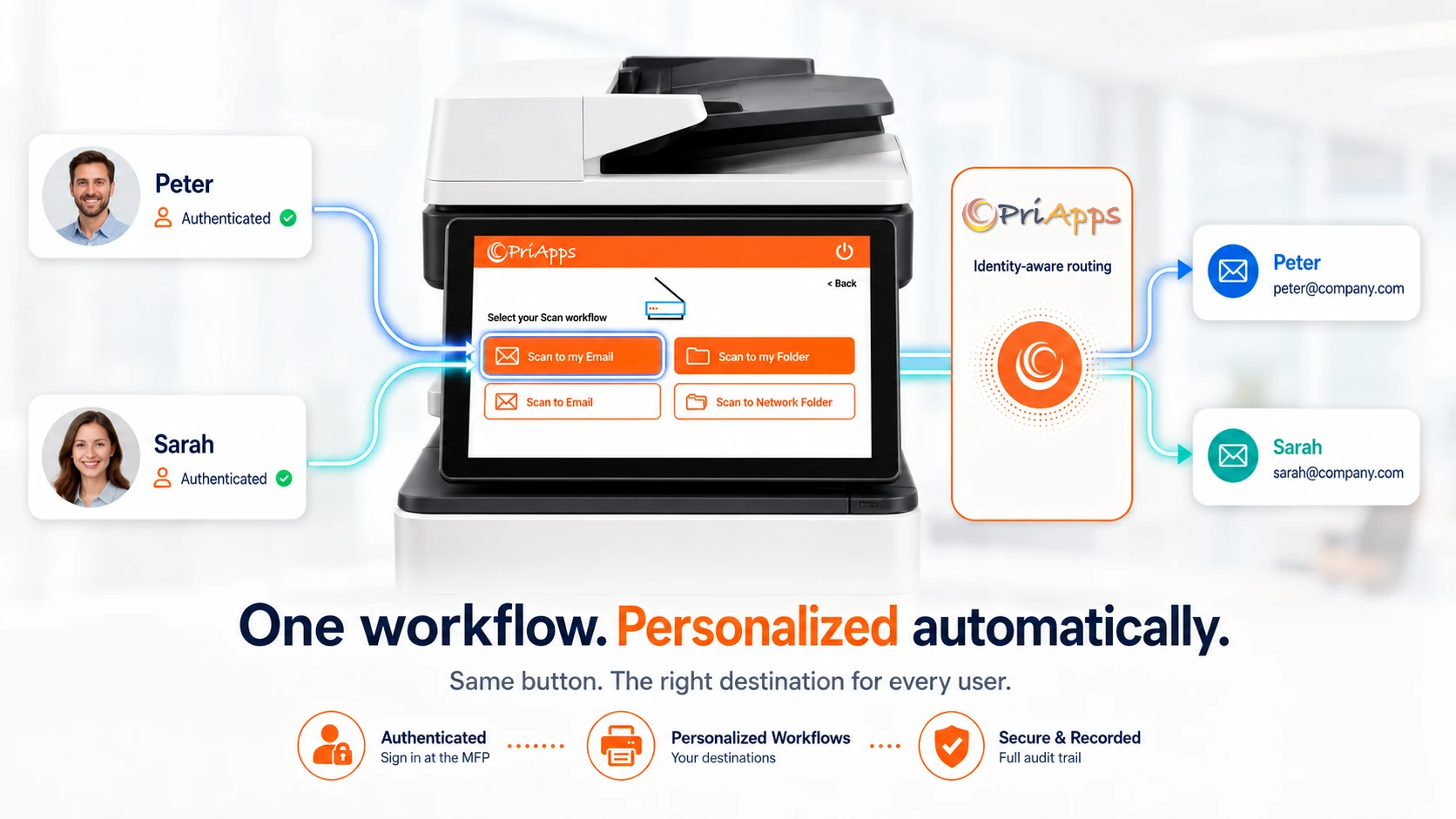
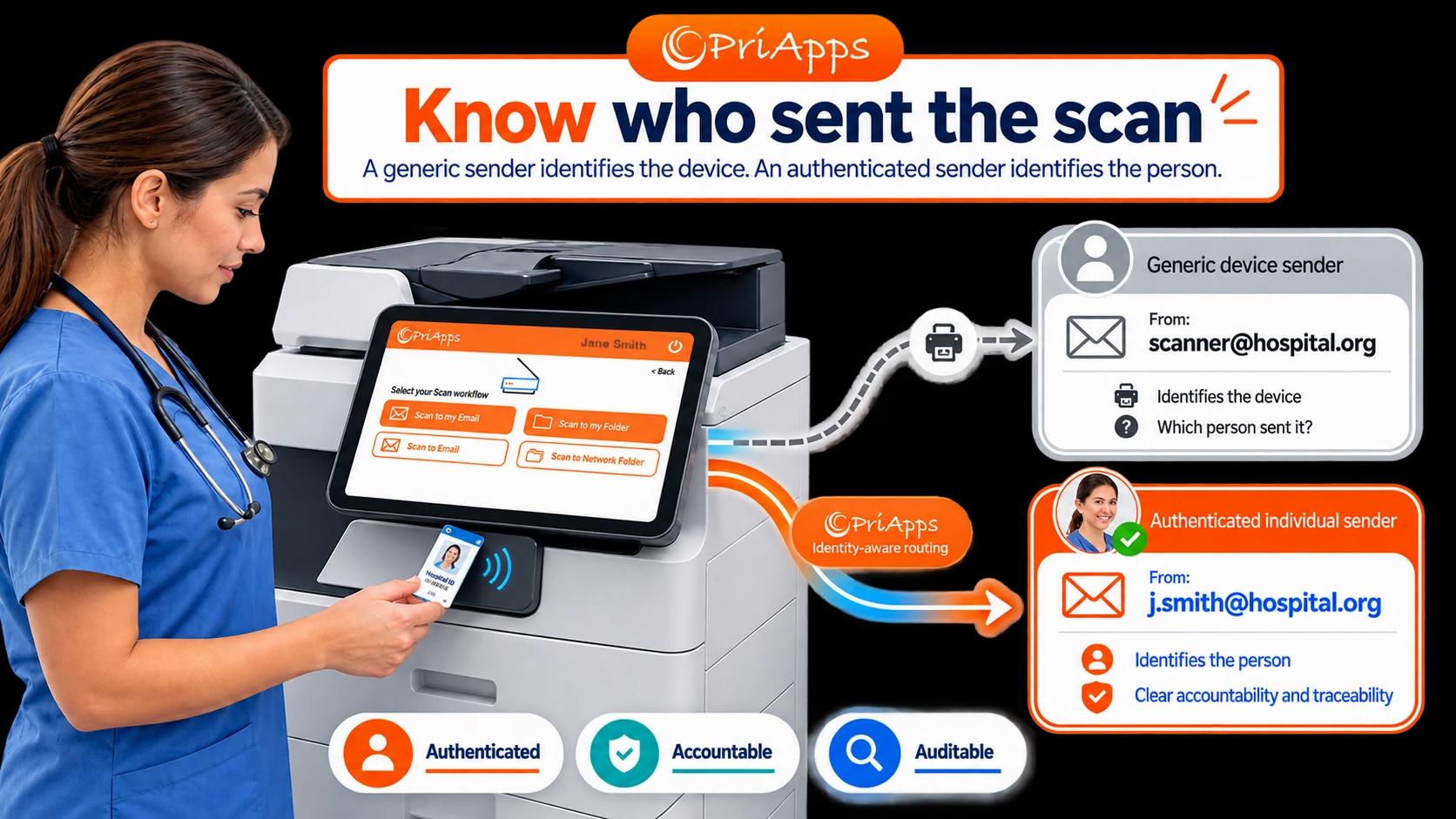
The person signing in sees the scan destinations and workflows that belong to them. No hunting through generic destinations or repeatedly entering the same addresses and folders at the panel. For scan-to-email workflows, documents can use the authenticated user’s individual email identity rather than a generic MFP sender — providing clearer accountability for who actually sent the document.
Often described as document capture, Personalized Scan Workflows connect documents scanned at your MFPs directly to the cloud services, folders and business applications your organization already relies on.
THE PROBLEM
Scanning is easy. Keeping control of what happens next is harder
Modern MFPs can scan documents to email, folders, cloud services and other destinations. The challenge in a shared environment is making those workflows personal, consistent and controlled.
Users may have to search through shared address books, enter destinations manually or choose from generic workflows that do not reflect who they are or where the document actually belongs. In scan-to-email environments, documents may also be sent from a generic device account, making it harder to establish which individual actually initiated the scan.
That distinction becomes particularly important in healthcare and other regulated environments. A message sent from scanner@hospital.org identifies the device. A scan sent using the authenticated user’s individual email identity identifies the person. That creates clearer accountability and makes the transaction easier to trace through the organization’s security and audit processes.
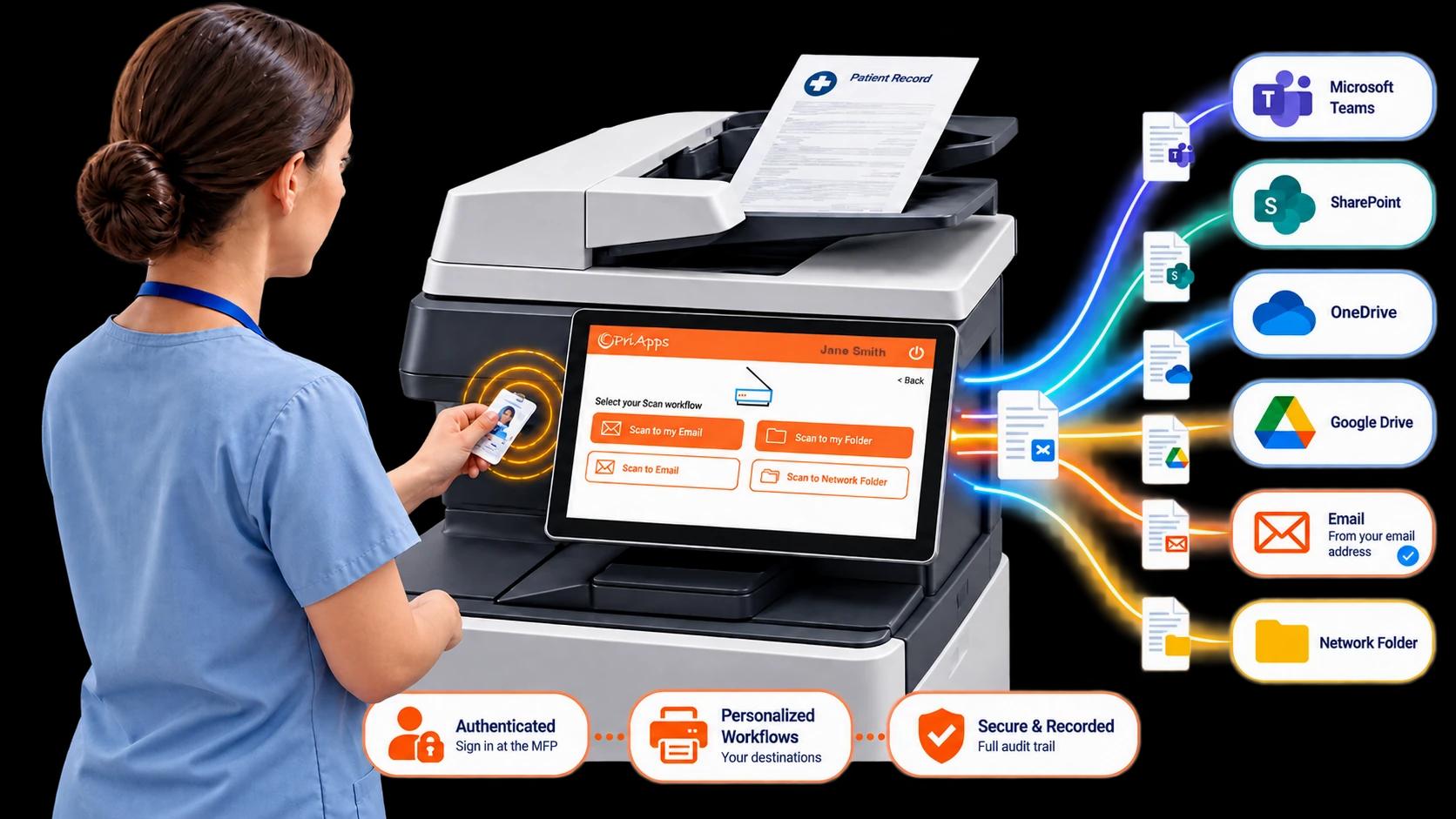
Personalized Scan Workflows close that gap. The user authenticates at the device and is shown the destinations and workflows assigned to them. The captured document is delivered securely to an approved location, and PriApps records the activity.
WHAT YOU GET
What PriApps adds
Personalized destinations
Each user signs in and sees their own scan workflows — the folders, mailboxes and cloud locations that belong to them or their role. No need to search through a generic address book for routine destinations or repeatedly enter the same information.
Straight into the systems you already use
Deliver scanned documents to Microsoft Teams, SharePoint, OneDrive and Google Drive, as well as email, network folders, document-management systems and business applications.
Controlled and secure
Access to scan functions and destinations is governed on a per-user and per-role basis, and administrators can restrict users to approved destinations.
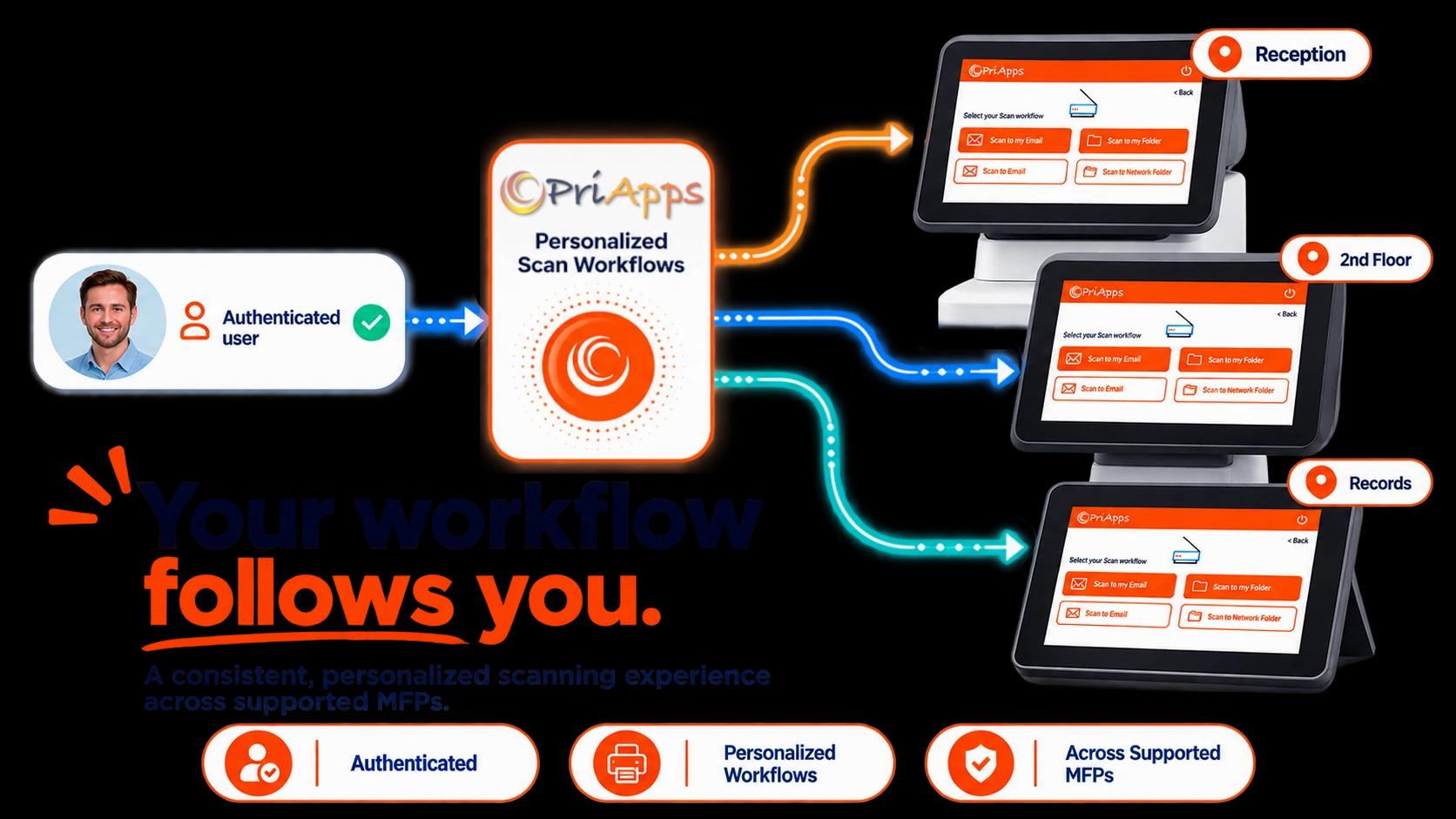
Consistent across supported MFPs
Provide a consistent personalized scanning experience across different multifunction-device brands, applying the capabilities available on each supported device.
Recorded and auditable
PriApps records scan activity — including the authenticated user, device, destination and time — extending the accountability you expect for printing to document capture. For scan-to-email workflows, the authenticated user's individual email identity can provide an additional layer of accountability beyond the device-level activity record.
HOW IT WORKS
From sign-in to delivered document
Authenticate
The user identifies themselves at the supported MFP — an access card, a PIN, their network credentials or their identity-provider login. This is what makes everything that follows attributable to an individual.
Choose a workflow
PriApps presents the scan workflows that belong to that user: their destinations, formats and settings, already configured.
Capture
The user scans at the device. The document is captured with the settings the workflow defines.
Route and deliver
PriApps delivers the document securely to the chosen destination — a cloud service, a folder, a mailbox or a business application. For configured scan-to-email workflows, the authenticated user's individual email identity can be used rather than a generic MFP sender.
Record
PriApps records the activity — including the authenticated user, device, destination and time — for reporting, auditing and usage analysis alongside the rest of your document activity.
PERSONALIZED SCAN WORKFLOWS
The workflow follows the person, not the machine
The value is not the scan — modern MFPs scan perfectly well on their own. The value is what happens around it.
When a user authenticates, PriApps knows who they are, and can present scan workflows built for them: the destinations they are entitled to, named in language they recognize, with the right format, resolution and filing settings already applied. One touch and the document is on its way.
That identity doesn’t have to stop at the touchscreen. For scan-to-email workflows, the resulting message can use the authenticated user’s individual email identity rather than a shared device account, maintaining personal accountability beyond the MFP itself.
That personalization is what turns generic device scanning into a workflow. It removes the retyping, the guesswork and the misfiled documents, and it means the same person gets a consistent experience across supported MFPs.
Related capability: MFP access and single sign-on
DESTINATIONS
Deliver to the systems your organization runs on
A scanned document is only useful when it reaches the right place. PriApps routes captured documents directly into the services people already work in:
Microsoft Teams
Into the files and locations associated with your Teams channels
SharePoint
Into the document libraries that hold your records
OneDrive & Google Drive
Into personal and shared cloud storage
To the user, colleagues or an approved mailbox. Where configured, scan-to-email can use the authenticated user's individual email address rather than a generic MFP sender, giving recipients a recognizable sender and administrators clearer accountability for who initiated the scan.
Network folders
Into the on-premises structure you already maintain
Document-management systems & business applications
Where a defined integration exists
Destinations are configured centrally and assigned by user and role, so people reach the locations they are entitled to.
WHERE IT APPLIES
Where document capture actually happens
It is worth being precise about where document capture applies.
Print submission and secure release can extend across a mixed fleet — multifunction devices, single-function printers and locally attached printers alike. Document capture is different. Scanning is a function of the multifunction device, so Personalized Scan Workflows run on supported MFPs, where PriApps’ embedded interface, authentication and scan control are available.
On a supported MFP, the user authenticates at the panel, sees their personalized workflows through the embedded PriApps interface, scans, and the document is delivered and recorded — all at the device.
We would rather tell you exactly where a capability applies than imply that every device in your estate can do everything. It keeps the promise honest and the deployment predictable.
Related capability: Check device compatibility
CONTROL & SECURITY
The captured document stays inside your controls
Scanning creates a new digital copy of a document — and that copy should be governed as carefully as the original. PriApps helps keep document capture inside your organization's security controls:
- Access to scan functions and destinations on a per-user and per-role basis, where the device supports it
- Centrally configured destinations and permissions that can restrict users to approved locations
- Encryption of supported communications and stored data, as documented for each PriApps component
- Detailed records of scan activity, including the authenticated user, device, destination and time
- Individual sender identity for scan-to-email workflows, allowing a scan to originate from the authenticated user’s email address rather than a shared device account
Particularly important in healthcare
For healthcare organizations, knowing who scanned and transmitted a document can be as important as knowing which MFP it came from.
A generic MFP email account identifies the machine but can make individual accountability less clear. PriApps ties document capture to an authenticated user and, for configured scan-to-email workflows, can preserve that individual identity in the email itself.
This provides a clearer audit trail and strengthens user accountability — helping healthcare organizations support the access-control, authentication, audit and transmission-security safeguards associated with protecting electronic protected health information (ePHI).
Together with controlled destinations and activity records, the scan is not simply an anonymous transaction from a shared device. It is associated with an identified user and can be traced through the organization’s document and messaging environment.
Related capability: Security and Identity
VISIBILITY & AUDIT
A record of scan activity
PriApps records the authenticated user, device, destination and time associated with scan activity, providing an audit trail alongside printing, copying and integrated fax-service usage.
For scan-to-email workflows, individual sender identity provides another layer of traceability: the email itself can identify the authenticated person who initiated the scan rather than only the shared MFP from which it originated.
Those records can support:
- Security investigations
- Compliance reviews
- Departmental reporting
- Cost allocation and recovery
- Usage analysis
Administrators manage scan workflows, destinations and permissions centrally, not device by device.
Related capability: Usage tracking and reporting
Strategy
Scanning as part of your document strategy
Scanning is often presented as an additional feature of print management. PriApps takes a broader approach: Personalized Scan Workflows make document capture part of the user’s identity, security and document workflow.
PriApps is not a dedicated OCR, indexing or specialist capture platform — and it does not need to reproduce capabilities that modern MFPs already provide well. Instead, PriApps adds the layer above the device: taking what the MFP captures and turning it into a controlled, personalized and auditable workflow, tied to the authenticated user and delivered to the appropriate destination.
That user identity can extend beyond the MFP itself. In scan-to-email workflows, the message can be associated with the authenticated user’s individual email identity rather than a generic device account — an important distinction where accountability and traceability matter.
For organizations that want scanning to form part of their wider document security and workflow strategy, that distinction matters.
PRODUCTS
Which PriApps product delivers this
Personalized Scan Workflows are included in the following PriApps products. Which one fits depends on your fleet, your identity environment and how you want it deployed.
PriApps SSO
Single sign-on and permission-based access at supported MFPs, so scan workflows are personalized to the authenticated user.
On-premises · Hybrid
PriApps CloudPrint
Cloud-native print management and document capture, delivering personalized scanning without on-premises infrastructure.
Cloud-native
PriApps for Microsoft 365
Document capture for Microsoft 365 subscribers, delivering scanned documents into the Microsoft 365 environment.
On-premises · Hybrid · Cloud-native
PriApps Touch-Free
Contactless authentication at the MFP, so a user can sign in and start their personalized scan workflow without touching the shared panel. The scan is performed at the device.
On-premises · Hybrid
A PriApps specialist will tell you which combination fits your fleet and identity environment.
Related capability: Deployment options
WHY PRIAPPS
Why PriApps
Personalized, not generic
Every user sees their own scan destinations and settings — no generic address book to search, nothing to retype.
Into the systems you already run
Microsoft Teams, SharePoint, OneDrive, Google Drive, email, network folders and business applications.
Precise about where it applies
Rich document capture on supported MFPs, described honestly rather than implied everywhere.
Part of a document workflow platform
Scanning connects to authentication, security, reporting and cost recovery — not a standalone bolt-on.
Governed and accountable
Per-user and per-role access, controlled destinations and detailed records of scan activity. For scan-to-email, the authenticated user's individual email identity can replace a generic shared-device sender — particularly valuable in healthcare and other regulated environments.
Specialists, not a ticket queue
People who understand MFPs, networks, identity and document capture, and who own a problem until it is resolved.
Frequently asked questions
What is document capture?
Document capture is the process of scanning a paper document at a device and delivering it into a digital destination — a mailbox, a folder, a cloud service or a business application. PriApps delivers this as Personalized Scan Workflows on supported MFPs.
Where can PriApps scan to?
Microsoft Teams, SharePoint, OneDrive, Google Drive, email, network folders, and document-management systems or business applications where a defined integration exists.
What makes a scan workflow “personalized”?
The user authenticates at the device, so PriApps can show them the destinations and settings that belong to them and their role — rather than a generic list everyone shares.
Does scanning work on any printer?
No. Scanning is a function of the multifunction device, so Personalized Scan Workflows run on supported MFPs. Print submission and secure release extend more broadly across a mixed fleet, but document capture is an MFP capability.
Can we control who scans to where?
Yes. Access to scan functions and destinations is governed on a per-user and per-role basis, and administrators can restrict users to approved destinations.
Are scans recorded?
Yes. PriApps records scan activity, including the authenticated user, device, destination and time, for reporting, auditing and usage analysis. For configured scan-to-email workflows, the authenticated user's email identity can also provide additional traceability beyond the shared device itself.
Can scans be sent from the user's own email address?
Yes. In configured scan-to-email workflows, PriApps can use the authenticated user's individual email identity rather than a generic MFP sender account. This gives recipients a recognizable sender and provides clearer accountability for who initiated the scan.
How does PriApps support HIPAA-related controls for document scanning?
PriApps helps healthcare organizations apply individual accountability and traceability to document capture. Users authenticate before scanning, their scan activity can be associated with their individual identity, and scan-to-email workflows can use the authenticated user's email identity rather than a generic device account. These capabilities can help organizations support HIPAA Security Rule safeguards relating to access control, authentication, audit controls and secure transmission of electronic protected health information. HIPAA compliance depends on the organization's overall policies, configuration and technical environment rather than on any single product or feature.
Is document capture available in the cloud?
Yes. PriApps CloudPrint is cloud-native, and PriApps for Microsoft 365 runs cloud-native, on-premises or hybrid.
Do users have to retype destinations every time?
No. Once a workflow is configured, the destination and settings are presented to the user automatically when they sign in.
Make scanning part of how you control documents
Give people a faster, more personal way to scan while keeping document capture governed, auditable and connected to the systems your organization already uses.
PriApps specialists can review your MFP fleet, your destinations and your identity environment, then recommend a Personalized Scan Workflows configuration built around how your organization actually works.