
RULES-BASED PRINTING
One rule doesn't fit everyone. PriApps applies the right policy to the right user and device.
Control how people print, copy, scan and fax with policies personalized by user, group, role and device.
PriApps gives organizations precise control over who can use particular devices, which functions they can access, when color is appropriate, and how documents are produced — without relying on one set of defaults for everyone.
BEYOND PRINT
Print policy is only part of the picture
Organizations have traditionally focused on print because print is relatively easy to control.
Need to reduce color costs? Default the print driver to mono.
Want to reduce paper consumption? Default it to duplex.
But these are blunt controls. They apply the same rule to everyone, regardless of what that person does, which department they work in, or why they are producing the document.
And controlling print alone doesn’t necessarily control behavior.
If a user needs 1,000 copies and printing is heavily restricted, they can simply print one original and make 1,000 copies at the MFP.
Effective policy has to extend beyond print.
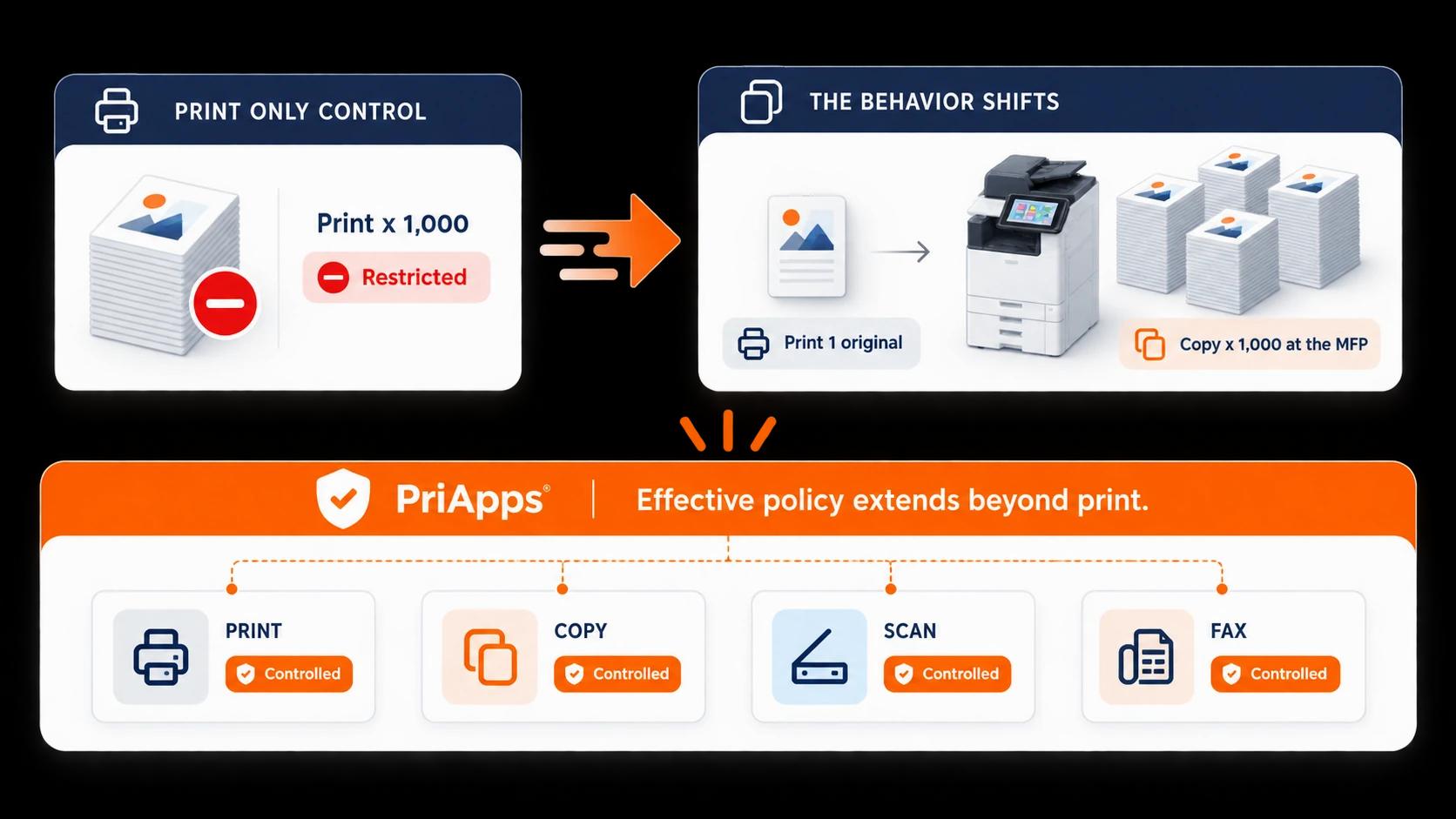
PriApps applies control across print, copy, scan and fax, allowing organizations to manage how documents are produced and distributed rather than controlling one part of the process in isolation.
CONTROL, NOT PREVENTION
Control doesn't mean prevent
Good policy isn’t about stopping people from working.
It’s about giving people access to the capabilities they need — while questioning or restricting unnecessary use.
Color is a good example.
Marketing may depend on color every day. Finance may need it occasionally. Other users may have little reason to use it at all.
A blanket “no color” policy makes little sense.
So does enabling color for everyone without question.
PriApps allows organizations to make color available to the people who need it, restrict it where appropriate, or encourage users to consider a lower-cost alternative.
As long as color printing and copying cost more than mono, organizations will have a reason to control color — not prevent it.
The same principle applies across the rest of the print, copy, scan and fax environment:
give people what they need, apply sensible controls, and make policy fit the user rather than forcing every user to fit the policy.
PERSONALIZED POLICIES
Policies personalized to your organization
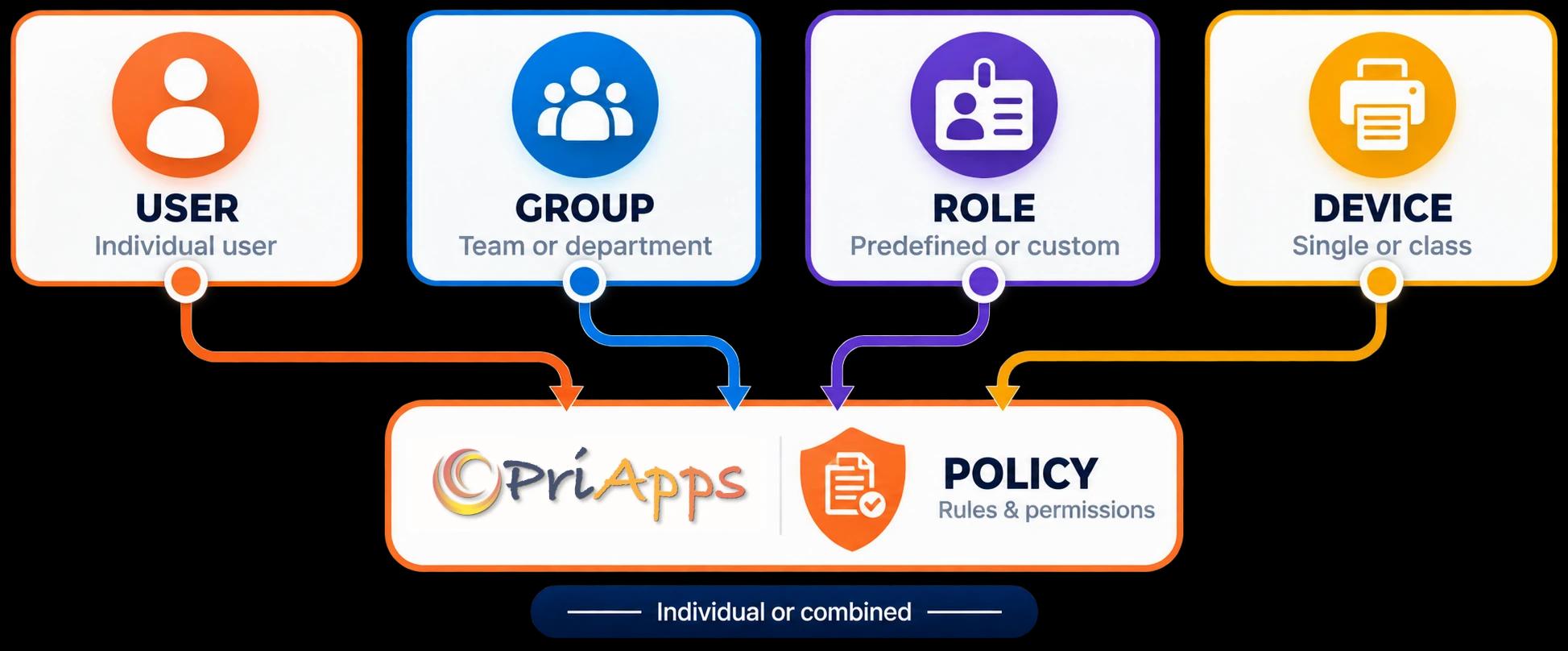
PriApps allows policies to be applied at the level that makes sense for each organization.
A rule can apply to:
- an individual user
- a group of users
- a Role
- a specific device
- a class of devices
- a location
- a department
- or a combination of these
That means policy can be broad enough to cover an entire office or department, or precise enough to control what one particular user is permitted to do on one particular device.
Instead of configuring one default for everyone, PriApps lets organizations reflect the way people actually work.
DEVICE-LEVEL CONTROL
One device. Different users. Different permissions.
Not every device should be available to everyone on the same terms.
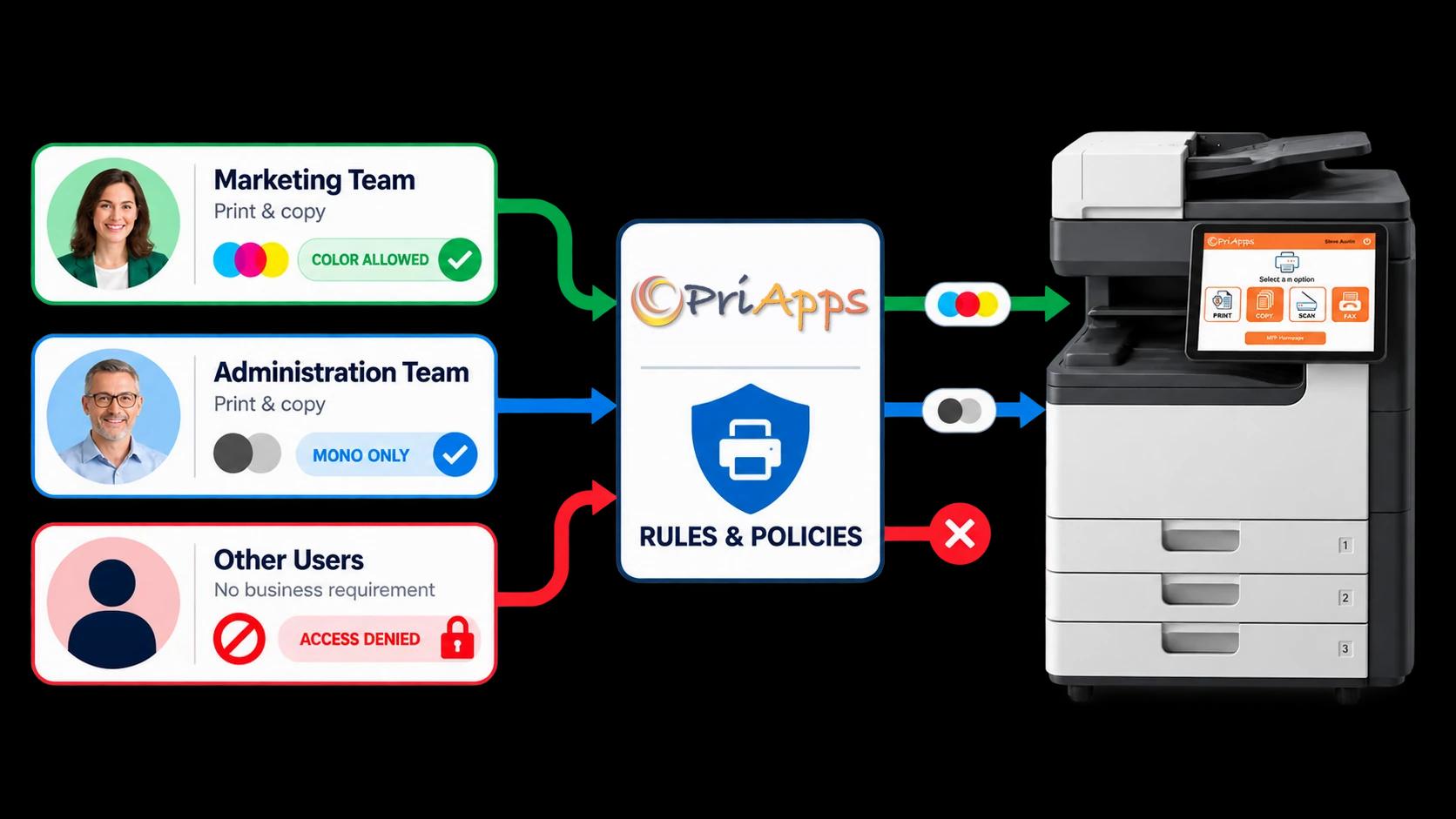
Consider an A3 color MFP in the Marketing department.
Marketing team
Members of Marketing can access the device and print and copy in color.
Administration team
Members of Administration can access the same device, but their print and copy permissions are limited to mono.
Other users
Users who have no business requirement to use the device can be denied access when they authenticate.
The device hasn’t changed.
The policy has — because the user has changed.
The same approach can reserve a high-volume A4 device in Finance for Finance users, restrict access to specialist devices, or determine which MFP functions different people are permitted to use.
ROLES
Control print, copy, scan and fax by Role
At supported MFPs, PriApps uses Roles to determine what an authenticated user is permitted to do.
Roles allow administrators to grant or restrict access to individual device functions on a per-user basis.
PriApps includes a range of predefined Roles, and organizations can create additional Roles to reflect their own requirements.
Configurable permissions include:
Document functions
Output controls
Fax functions
Storage and filing
Administration
A user therefore doesn’t simply have access to an MFP.
PriApps can determine what that user is allowed to do once they get there.
ENFORCE OR GUIDE
Apply the rule — or help the user make a better choice
Not every policy needs to result in a hard restriction.
Some should be enforced automatically.
Others are more effective when the user is given information and allowed to make an informed decision.
PriApps supports both approaches.
Apply the policy automatically
Policies can automatically control how a print job is processed — for example by applying mono or duplex requirements, restricting access, or directing work toward an appropriate device.
Help the user make a better choice
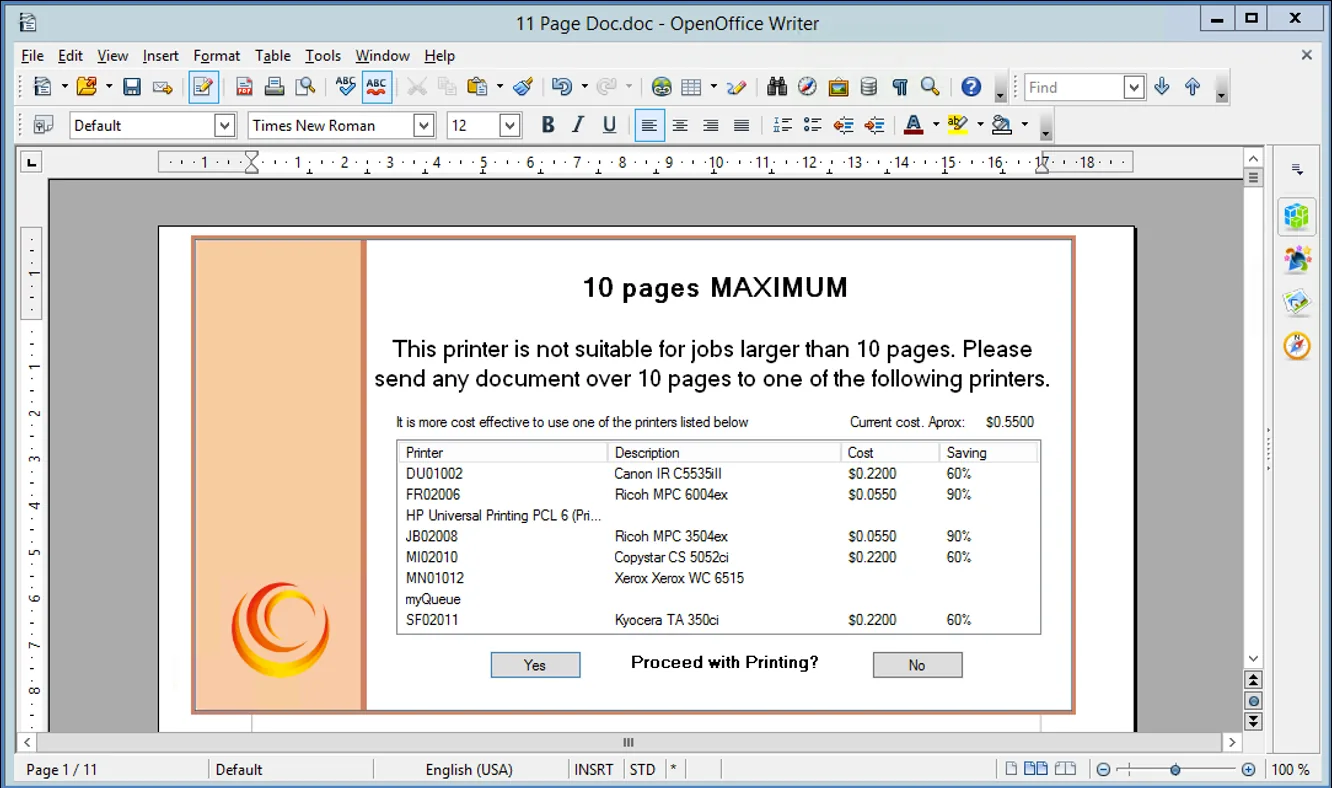
The PriApps Desktop Agent for Windows — available with on-premises deployments — can interact with users when a print job meets particular policy conditions.
- A user printing a large document to an expensive desktop device can be encouraged to use a more cost-effective device instead.
- A user choosing color can be shown the difference in cost between color and mono and asked whether color is really necessary.
The objective isn’t simply to block activity.
It is to influence behavior at the point where the user can still make a better decision.
ARCHITECTURE
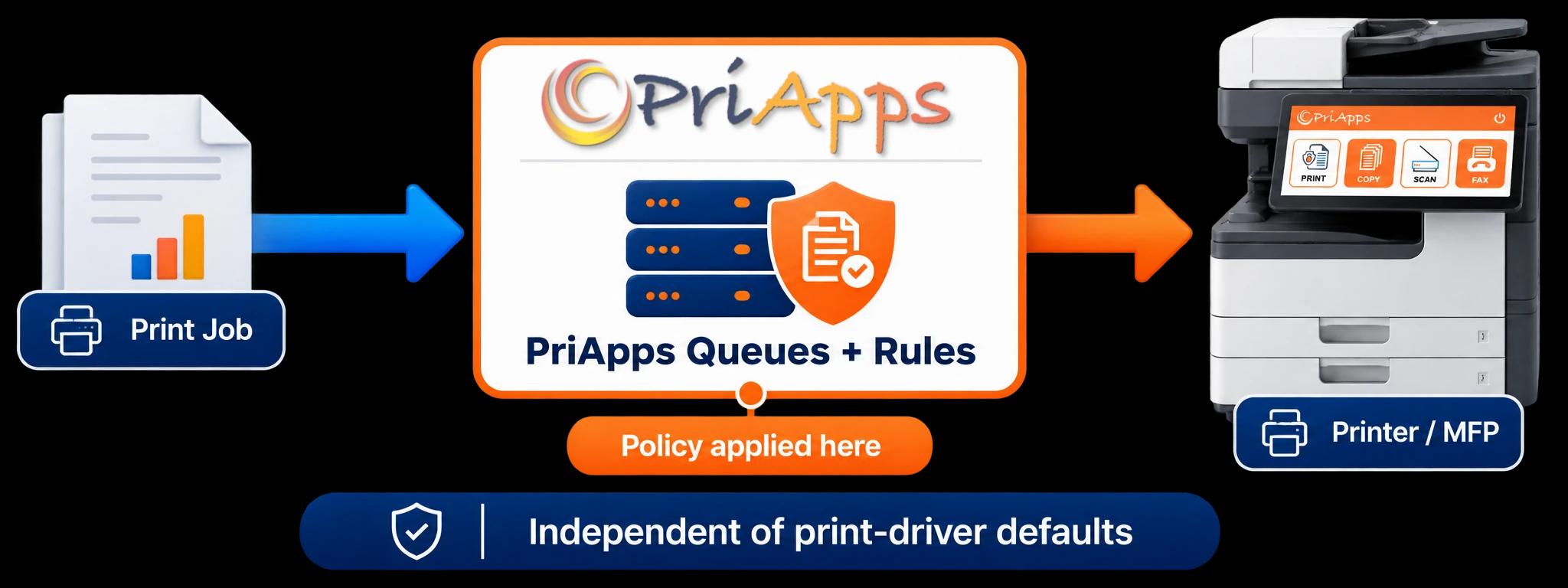
Print policy without depending on the print driver
Traditional print controls have often depended on settings configured in the print driver.
Mono by default.
Duplex by default.
Perhaps different defaults on different queues.
As organizations increasingly adopt IPP and modern driverless printing, relying on driver configuration becomes less practical.
PriApps takes a different approach.
PriApps replaces conventional print-server queues with PriApps-managed print queues, giving the platform direct control over how print jobs are processed.
That means print policy does not depend on an administrator, copier dealer or OEM configuring the right default in every individual print driver.
It also means PriApps print rules can be applied across any make or model of printer and MFP managed through the PriApps print environment.
This capability reflects PriApps’ heritage in enterprise output management — treating printing as controlled infrastructure rather than simply adding management tools around a conventional print server.
WHERE CONTROL APPLIES
Policy where it needs to be applied
PriApps applies different controls at the appropriate point in the workflow.
At the print queue
Apply print policies such as color control, duplex requirements, device access and other print-job rules across the fleet.
At the MFP
Control which authenticated users can print, copy, scan, fax, use color, access storage functions or administer the device on supported MFPs.
At the user's PC
Use the PriApps Desktop Agent on Windows PCs (on-premises deployments) to interact with users when a job meets defined policy conditions and encourage a more appropriate choice.
Together, these controls allow organizations to govern the whole document output process, rather than concentrating only on what happens when somebody presses Print.
The right capability.
For the right person.
On the right device.
WHY PRIAPPS
Why PriApps for policy control?
Personalized, not one-size-fits-all
Apply policy by user, group, Role, department, location and device rather than relying on one default for everyone.
More than print
Extend control across copy, scan and fax so restricting one activity doesn't simply move the behavior somewhere else.
Independent of driver defaults
Apply print policy through PriApps-managed queues rather than depending on settings within traditional print drivers.
Control without unnecessary restriction
Provide capabilities such as color to the people who need them while controlling, questioning or restricting their use elsewhere.
Device-level control
Decide not only who can authenticate at an MFP, but which functions each user is allowed to access.
Enforce or influence
Apply policies automatically where necessary, or help users make better decisions when choice is more appropriate.
PRODUCTS
Which PriApps products include Rules-based Printing?
Rules-based Printing isn’t a separate add-on — it’s part of PriApps print management and is available across all PriApps products.
You’ll find it in PriApps SSO, PriApps Secure Print, PriApps CloudPrint, and PriApps for Microsoft 365, and within the PriApps industry editions. Rules-based Printing is available with on-premises, hybrid and cloud-native deployments; the PriApps Desktop Agent — the Guide capability — is available with on-premises deployments.
PriApps SSO
Rules-based Printing included
PriApps Secure Print
Rules-based Printing included
PriApps CloudPrint
Rules-based Printing included
PriApps for Microsoft 365
Rules-based Printing included
Frequently asked questions
What is rules-based printing?
Rules-based printing applies policies automatically according to factors such as the user, group, Role or device rather than relying on the user to make every decision or on a single driver default applied to everyone. PriApps extends the same policy approach beyond printing to copy, scan and fax functions at supported MFPs.
Can PriApps apply different policies to different users?
Yes. Policies can be applied to individual users and devices or to groups and classes of device. Users can also be grouped by factors such as department, location and Role.
Can PriApps restrict which devices people use?
Yes. Access can be granted or denied according to the user or group. Different users can also have different permissions on the same device.
Can we let some users have color while restricting others?
Yes. Color does not need to be universally enabled or universally prohibited. PriApps can provide color to users or groups that require it while restricting or questioning its use for others.
Does PriApps only control printing?
No. Print policy is only one part of the PriApps approach. At supported MFPs, PriApps Roles can also control access to copy, scan, fax, email, color, storage and administrative functions.
Why is controlling copy as well as print important?
Because controlling only one output method can simply move the activity elsewhere. A user prevented from producing a large print job could, for example, print a single original and create the remaining copies using the copier. Applying policy across both print and copy provides more effective control.
Does PriApps depend on print-driver defaults?
No. PriApps manages print jobs through PriApps-controlled queues, so policies do not depend on traditional driver defaults such as mono or duplex settings.
Do PriApps print policies work across different printer manufacturers?
Print-queue policies can be applied across any make and model managed through the PriApps print environment. Controls applied directly through the PriApps MFP interface require a supported MFP.
Is the PriApps Desktop Agent available with cloud deployments?
The PriApps Desktop Agent is available with on-premises deployments. Enforced policies — such as color control, duplex requirements and device access — apply across on-premises, hybrid and cloud-native deployments.
RELATED SOLUTIONS
Related solutions
Quota Management
turn limits into allowances by user, group or budget
ExploreSecure Print Release
hold jobs until the user authenticates and releases them
ExploreCost Recovery & Billing
allocate and recover the cost of what's produced
ExploreUsage Tracking & Reporting
measure activity and the effect of your policies
ExploreControl what matters — without getting in the way of the people who need it.
Give users access to the print, copy, scan and fax capabilities their work requires.
Control unnecessary cost and usage.
Protect access to devices and functions.
And apply policy according to who the user is and what they need to do — not simply according to the default setting on a print driver.