
QUOTA MANAGEMENT
Control usage without standing in the way of work
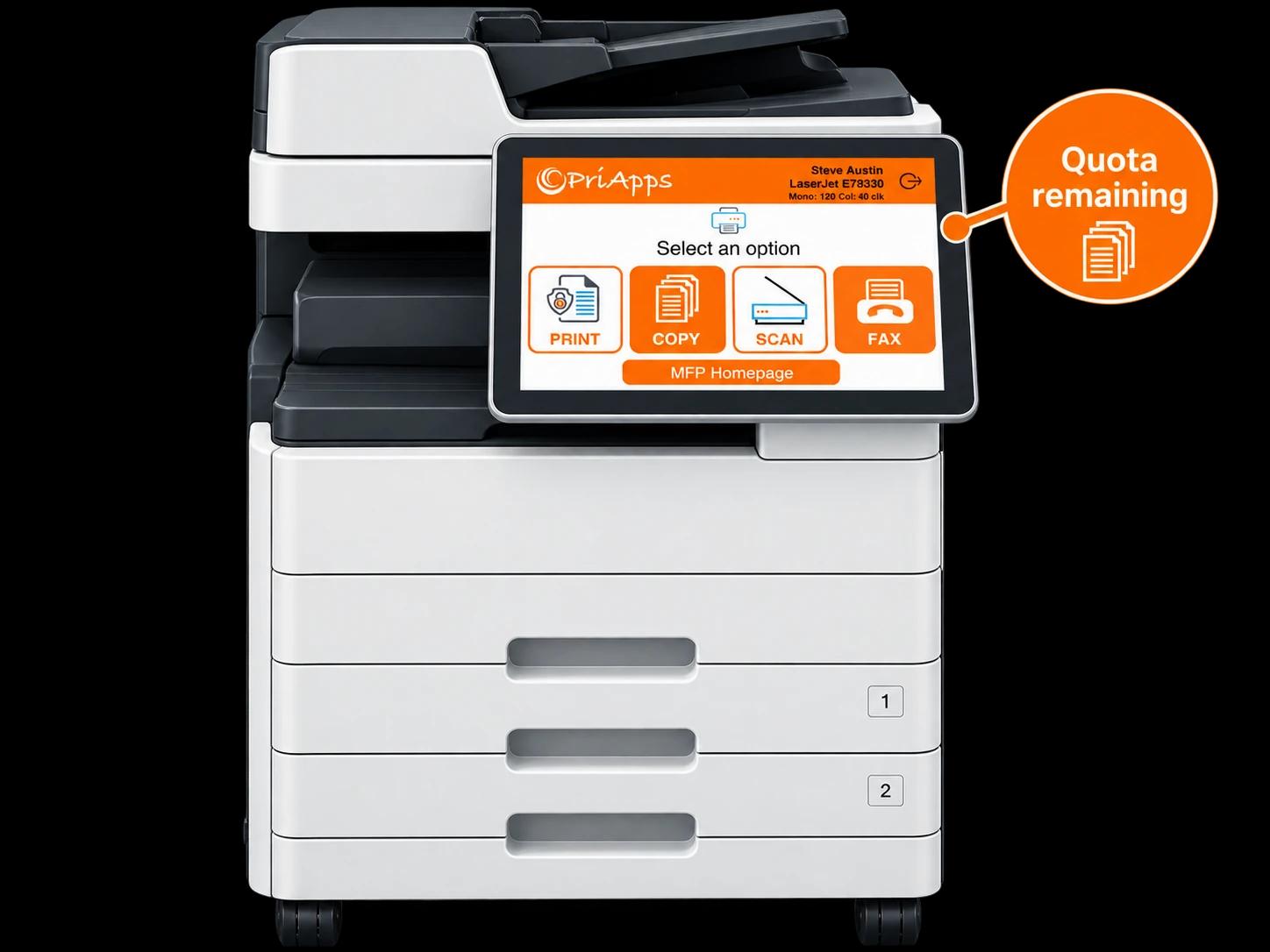
Set fair, flexible allowances for print, copy, scan and fax — measured by Click, Color, Cost or Page. PriApps makes users aware of their remaining quota and applies the controls you choose when they reach it.
Give people the allowance they need to work, while keeping unnecessary usage and cost under control.
THE PRINCIPLE
Control doesn't mean prevent
A quota isn’t about stopping people from working. It’s about giving them a clear, fair allowance — and making sure they know where they stand.
Most usage is legitimate. The goal is to remove the waste, curb the unnecessary, and make the true cost of printing visible — without turning every print job into a negotiation.
The right limit, in the right place, applied the right way.
HOW QUOTAS ARE MEASURED
Count what matters to your organization
A quota can be measured in four different ways — so you can control usage in the terms that make sense for your budgets and your fleet.
Click
Count each impression — every side of every sheet. A simple, device-level measure that works consistently across your fleet.
Color
Distinguish color output from black and white, so the cost of color printing can be controlled where it matters most.
Cost
Measure usage in money. Allowances are spent against the real cost of each job, reflecting device, paper size and color.
Page
Count pages rather than impressions, for organizations that prefer to think in documents rather than clicks.
BEFORE THE JOB PRINTS
Stop unnecessary output before the money is spent
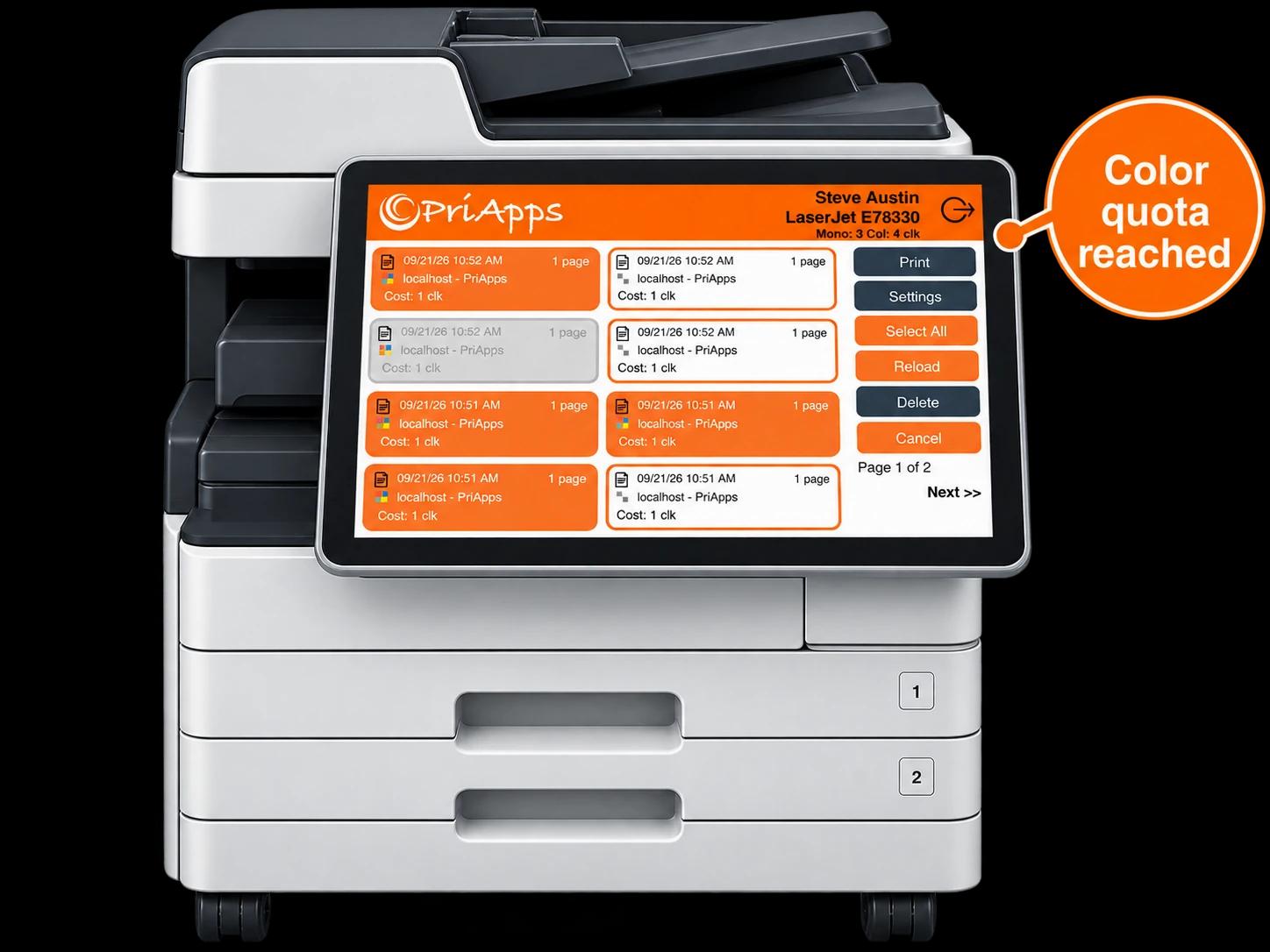
The most effective place to control cost is before a job ever reaches the paper. When a user is out of allowance, PriApps can hold the job at the point of release rather than letting it print.
The user sees why the job is held and how much allowance remains, rather than discovering a problem at the tray. Where you prefer, a rule can decide what happens instead of a simple stop.
Because the check happens as the job is released, the control is applied at exactly the right moment — not after the cost has already been incurred.
Nothing prints. Nothing is wasted. The limit is applied before the user commits to the job.
AT THE DEVICE
When the final usage isn't known until the job starts
Some activity — a long copy run, a multi-page scan — only reveals its true size once it's under way. For these, PriApps offers two ways to enforce the same allowance at the device.
Zero Stop
The activity stops the instant the allowance reaches zero. No overage is permitted.
Job halts the moment the balance hits zero.
Overrun
The job in progress is allowed to finish, and the overage is recorded against the user for accounting.
Job finishes; overage recorded and charged back.
Two ways to enforce the same allowance: stop at zero, or allow the current job to finish and record the overage.
HOW IT WORKS
From allowance to enforcement
Set the allowance
Decide the measure — Click, Color, Cost or Page — and the amount, for a user, group or department. Assign different allowances to print, copy, scan and fax.
Show users where they stand
PriApps makes users aware of their remaining quota, so people can manage their own usage before they reach the limit.
Enforce the limit
When the allowance runs out, PriApps applies the control you chose — a warning, a stop, or a rule that decides what happens next.
Refresh automatically
Allowances reset on the schedule you set — absolute, additive or capped — with a manual refresh available whenever it's needed.
FLEXIBLE CONTROL
As broad or as precise as your organization needs
Quota Management flexes from a single organization-wide allowance to detailed control by user, activity, device and location.
Ways to shape an allowance
Quota Management can be simple where simple is enough — and more granular where greater control is required.
REFRESH POLICIES
Allowances that reset the way you want them to
When an allowance renews, the balance can be handled in three ways — so the reset matches the way your budgeting works.
The balance is reset to a fixed figure. Whatever remained is discarded — everyone starts the period with the same allowance.
The new allowance is added to whatever was left. Unused balance carries forward, rewarding users who print sparingly.
The new allowance is added, but the balance can never exceed a set ceiling. Carry-forward is allowed, up to a limit.
Administrators can also force a manual refresh whenever required.
Quotas + Rules
A quota can do more than count — it can decide
A remaining allowance doesn’t have to end in a simple stop. Feed it into a rule, and a job can be routed to a cheaper device, forced to mono, or redirected entirely — based on the quota that’s left.
Related solution: Rules-based Printing →
ACROSS SITES & SERVERS
One allowance, wherever the user works
A person’s allowance shouldn’t depend on which building they walk into or which server handles their job. PriApps keeps a user’s quota consistent across sites and servers.
Print in one location in the morning and another in the afternoon, and the same balance follows — not a separate, unconnected allowance on each system.
One user. One quota. Consistent control across the organization.
PRODUCT AVAILABILITY
Quota Management across the PriApps range
Quota Management is delivered by several PriApps products, so the capability fits the environment you run.
PriApps SSO
Identity at the MFP that ties every job — and every allowance — to the individual user.
PriApps Secure Print
Hold jobs until release, and check the user's remaining quota at the point the job is released.
PriApps for Microsoft 365
Bring quotas and allowances into Microsoft 365 and Universal Print environments.
PriApps for Legal
Combine allowances with client and matter accounting for professional-services organizations.
PriApps CloudPrint does not currently include Quota Management. Where user allowances and quota enforcement are an important requirement, a PriApps specialist can recommend the product and deployment approach that best fits your environment.
RELATED SOLUTIONS
Part of a wider approach to cost and usage control
Rules-based Printing
Turn allowances into decisions — route, restrict or redirect a job based on the quota that remains.
Explore →Secure Print Release
Release jobs at the device only after the user authenticates — the natural point to check a quota.
Explore →Usage Tracking & Reporting
See who is printing what, where and at what cost — the visibility that makes allowances meaningful.
Explore →Cost Recovery & Billing
Attribute and recover the cost of print, copy and scan across departments, clients and matters.
Explore →Frequently asked questions
What can PriApps set a quota on?
PriApps can set allowances for print, copy, scan and fax. Each activity can carry its own quota, measured by Click, Color, Cost or Page, and applied to individual users, groups or departments.
How is a quota measured?
A quota can be measured in four ways: Click (each impression), Color (color output distinguished from black and white), Cost (the real money value of each job) or Page (whole pages rather than impressions). You can use one measure or combine several.
Can I set different quotas for different people?
Yes. Allowances can be set for an individual user, or applied across a group, department or the whole organization. Different users, groups and activities can each carry different quotas.
What happens when a user reaches their limit?
You choose. PriApps can warn the user, stop the job before it prints, or hand the decision to a rule that responds to the document or the device. For jobs where the final usage isn't known until the job starts, you can stop at zero or allow the current job to finish and record the overage.
Does the user know how much quota they have left?
Yes. PriApps makes users aware of their remaining allowance, so people can manage their own usage and avoid reaching the limit unexpectedly.
How do allowances reset?
Allowances reset on the schedule you set — daily, weekly, monthly, termly or annually. Three refresh policies are available: Absolute (reset to a fixed figure), Additive (add to whatever remains) and Capped (add to whatever remains, up to a ceiling). Administrators can also force a manual refresh whenever required.
Can unused allowance carry forward?
Yes, if you choose an additive or capped refresh policy. Additive carries the full unused balance forward; capped carries it forward up to a set maximum. An absolute policy discards whatever remains and starts everyone at the same figure.
Can a quota do more than stop a job?
Yes. A remaining allowance can feed a rule, so instead of simply stopping, a job can be routed, restricted or redirected based on the quota that's left. Quota Management and Rules-based Printing work together.
Does a quota follow the user across sites and servers?
Yes. A user's allowance applies consistently wherever they work — one user, one quota — across sites and servers, rather than a separate, unconnected balance on each system.
Which PriApps products include Quota Management?
Quota Management is available with PriApps SSO, PriApps Secure Print, PriApps for Microsoft 365 and PriApps for Legal. PriApps CloudPrint does not currently include Quota Management; where user allowances and quota enforcement are an important requirement, a PriApps specialist can recommend the product and deployment approach that best fits your environment.
Is Quota Management difficult to run?
It can be as simple or as granular as you need. A single organization-wide allowance is straightforward to set; more detailed control — by user, activity, device or location — is available where greater precision is required.
Put the right limits in the right places
Give people the allowance they need to do their work, and keep unnecessary usage and cost under control — with the flexibility to be as broad or as precise as your organization requires.
See how PriApps sets, shows and enforces allowances across print, copy, scan and fax.