
MOBILE & BYOD PRINTING
Secure printing from the devices people actually carry
Employees, students and visitors expect to print from their own phones, tablets and laptops.
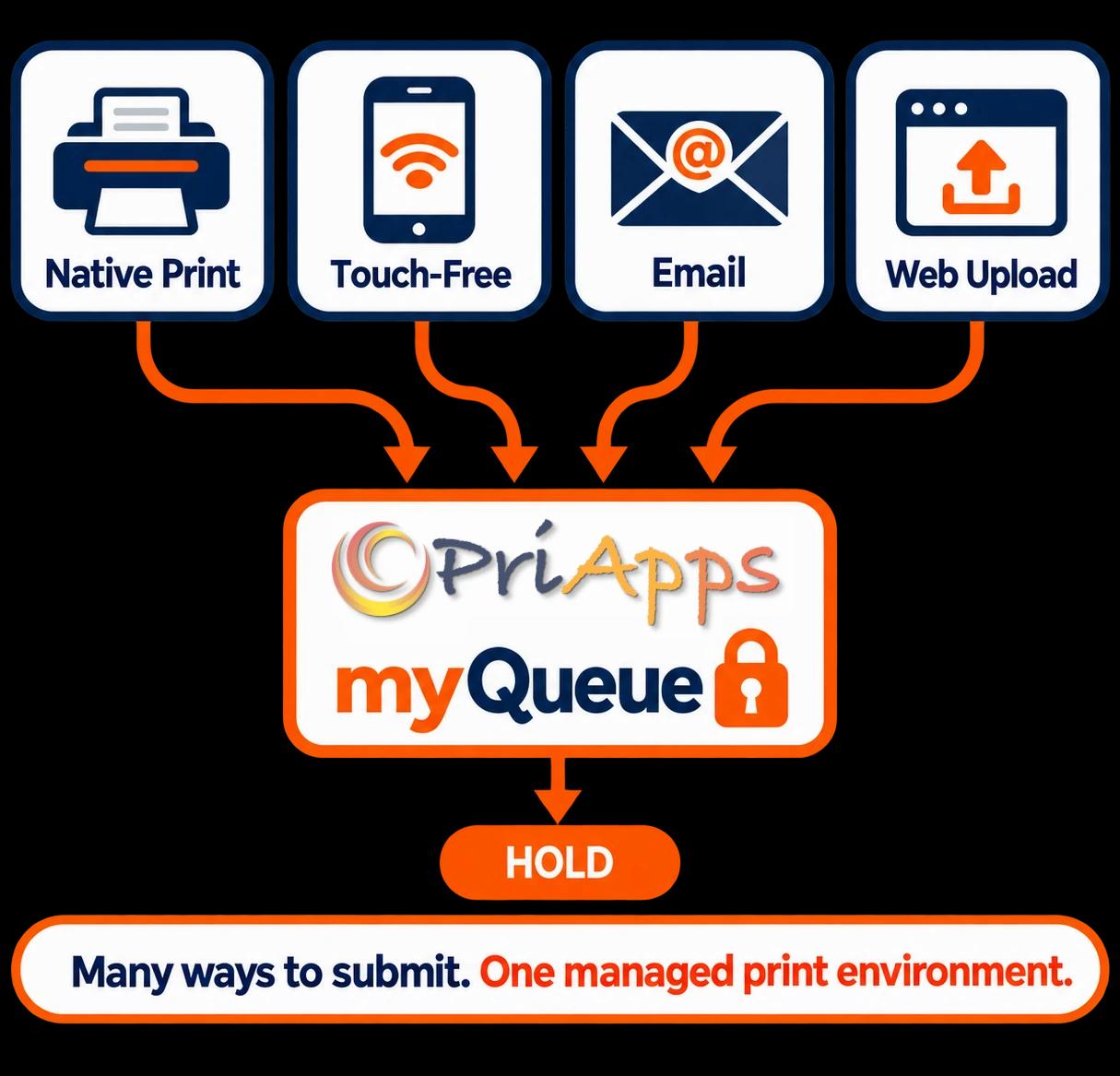
PriApps lets them print using their device's own print function, the PriApps Touch-Free app, email or a secure web page — without installing printer drivers.
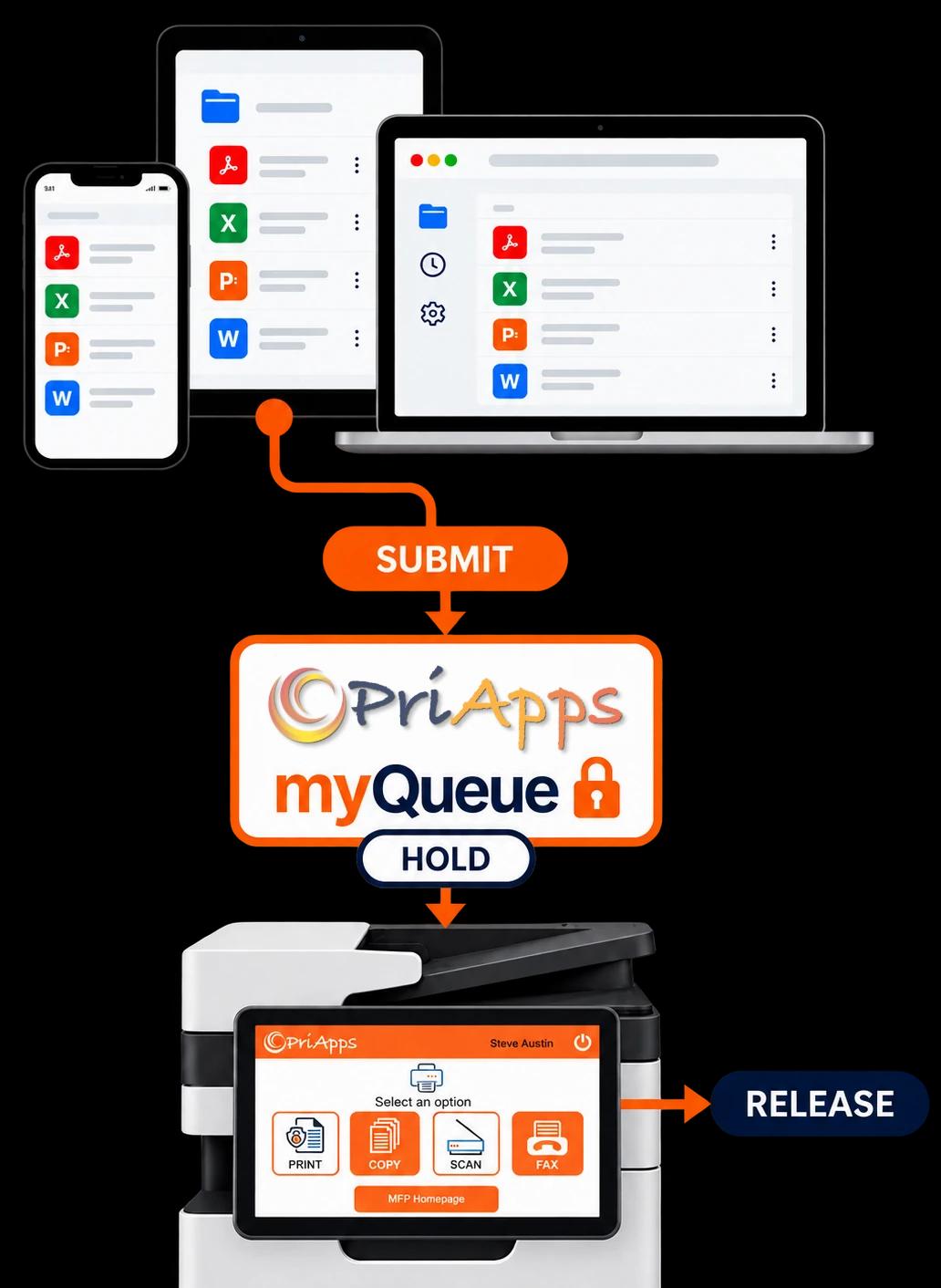
Mobile print jobs can be securely held until the user is ready to release them, while PriApps identifies, controls and records the activity just like any other print job.
THE CHALLENGE
Personal devices shouldn't be a blind spot
Most organizations face one of two outcomes with personal devices.
Mobile printing is blocked, so users find workarounds such as emailing documents to somebody else to print.
Or mobile printing is allowed informally, with limited visibility into who printed what, where or at what cost.
Neither approach is ideal.
PriApps brings mobile and BYOD printing into the same managed environment as desktop printing. Jobs can be associated with an identified user, securely held, controlled by policy and recorded for reporting and cost allocation.
HOW USERS SUBMIT
Print the way that suits the user and the device
PriApps supports multiple ways to submit documents, so users do not need a particular device, application or operating system to print.
Native mobile printing
iPhone, iPad and Android users can print using the standard print function already built into their device. No printer driver or PriApps app is required.
PriApps Touch-Free
Users can submit documents from the PriApps Touch-Free app on their iOS or Android device and release them from the same app.
Users can send documents by email to their personal PriApps myQueue or directly to a specific printer.
Secure web upload
Documents can be uploaded through a secure web page from any device with a browser.
AIRPRINT & ANDROID PRINTING
Your printers, on their mobile print menu
PriApps makes the myQueue available through the standard print experience on iPhone, iPad and Android devices.
On Apple devices, PriApps uses Bonjour discovery to present the myQueue through AirPrint. Users simply select PriApps from the print menu and print in the familiar way they would at home.
PriApps can also extend mobile printing to existing printers that do not natively support AirPrint, helping organizations get more value from the equipment they already own.
Administrators decide whether the PriApps myQueue is available to mobile devices, so mobile printing is enabled where it is needed rather than being available by default.
PRINT BY EMAIL
Forward it. Print it.
Email provides one of the simplest ways to print from almost any device.
Users send a document to their PriApps myQueue or to a designated printer. By default, emailed jobs are held until the user releases them, helping prevent large or unwanted documents from being printed and left uncollected.
PriApps can print the email itself, its attachments, or both.
Most print-management products print one attachment per email. A single email can contain multiple attachments and PriApps can print them all, without requiring the user to send each document separately.
DOCUMENT FORMATS
Print the files people actually use
PDF and other print-ready files can pass directly through PriApps.
PriApps can also automatically process a wide range of office document formats, including Microsoft Word, Excel and PowerPoint files, without requiring the user to have the application that originally created the document.
Most print-management products stop at PDFs and Office documents. Support in PriApps can be extended to additional document formats where required.
Users spend less time converting documents before printing, while organizations can support the file types their people actually work with.
SECURE RELEASE
Secure by default. Flexible when you need it.
By default, mobile print jobs are held securely in the user's PriApps myQueue alongside documents submitted from their desktop.
The user then authenticates at a convenient printer or MFP and chooses what to release.
Authentication can include:
On supported MFPs, users release documents through the embedded PriApps interface. On other supported devices, jobs can be released from the PriApps Touch-Free app.
Where a particular workflow requires documents to print immediately on arrival, PriApps can be configured accordingly.
Documents that are never collected can expire and be deleted without being printed.
Related solution: Secure Print Release →
HOW IT WORKS
From personal device to printed page
The PriApps mobile printing workflow is straightforward.
Identify
By default, mobile and BYOD printing is associated with a user known to PriApps, so submitted jobs belong to an identifiable person.
Submit
The user prints using their device's standard print function, Touch-Free, email or secure web upload.
Hold
PriApps places the job in the user's myQueue and processes the document for printing where required.
Release
The user authenticates at the printer or MFP and releases the required documents.
Record
PriApps records who submitted the job, where it was released and when, providing information for reporting and cost allocation.
GUEST & HOSPITALITY PRINTING
Let visitors print without giving them the keys
Visitors, contractors, conference delegates and hotel guests sometimes need to print — but they should not need a permanent network account, printer driver or help from IT.
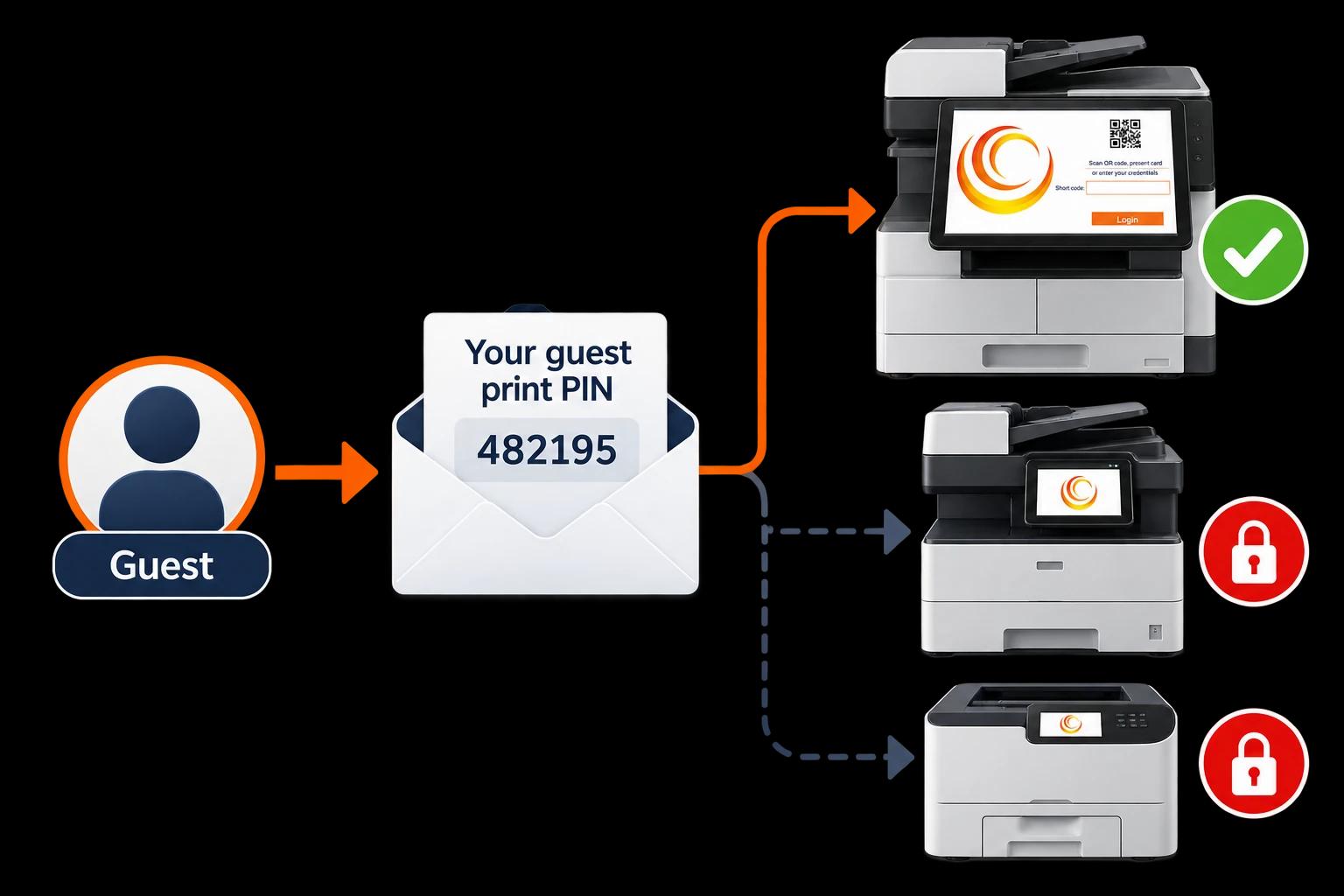
When guest printing is enabled, PriApps can create a temporary account and email the visitor a PIN for releasing their documents.
The notification can also tell the guest which printer or printers they are permitted to use.
This allows organizations to provide convenient guest printing while limiting access to designated devices and maintaining accountability for each visitor's activity.
CONTROL WITHOUT FRICTION
Control doesn't mean prevent
Blocking personal devices does not remove the need to print. It often just moves the printing into workarounds that are harder to manage.
PriApps brings mobile printing inside the organization's existing controls instead.
- Administrators can decide who can print from mobile devices and which printers guests can access.
- Jobs submitted from personal devices can be tracked, reported and allocated to users, departments or Cost Accounts.
- The same Rules-based Printing, quotas and permissions used for desktop printing can also apply to mobile printing.
People continue working from the devices they prefer. IT retains visibility and control.
Related solutions: Rules-based Printing · Quota Management · Usage Tracking & Reporting
A MOBILE PIONEER
Built on years of mobile-printing experience
PriApps was an early pioneer of secure print release from smartphones.
That experience now forms part of the PriApps Touch-Free application and continues to influence the way PriApps approaches mobile printing: making printing convenient for users without sacrificing control over the document.
PRODUCT AVAILABILITY
Mobile & BYOD Printing across the PriApps range
Mobile & BYOD Printing is available with:
PriApps SSO
PriApps Touch-Free
PriApps CloudPrint
PriApps for Microsoft 365
PriApps for Google Workspace
PriApps for Legal
A PriApps specialist can recommend the product and deployment approach that best fits your users, devices and infrastructure.
RELATED SOLUTIONS
Related solutions
Secure Print Release
Hold documents securely until the user authenticates and chooses to release them.
Explore →Single Sign-On for MFPs
Sign in at a supported MFP and access permitted print, copy, scan and fax functions.
Explore →Usage Tracking & Reporting
Understand who is printing, copying, scanning and faxing, where activity takes place and how resources are being used.
Explore →Rules-based Printing
Apply print policies based on users, groups, devices, locations and other conditions.
Explore →Printing from Chromebooks
Print securely from managed Chromebooks, with central deployment and user-level accountability.
Explore →Frequently Asked Questions
Which devices can users print from?
PriApps supports printing from iPhones, iPads, Android smartphones and tablets, and personal laptops. Users can print using their device's standard print function, the PriApps Touch-Free app, email or secure web upload.
Does PriApps support AirPrint?
Yes. PriApps uses Bonjour to make the PriApps myQueue available to iPhone and iPad users through AirPrint. PriApps can also make printers that do not themselves support AirPrint available for mobile printing.
Do users need to install a printer driver or app?
No. Users can print using their device's built-in print function, email or secure web upload. The optional PriApps Touch-Free app also lets users submit and release print jobs from their smartphone.
Which file formats can users print?
PriApps supports print-ready files such as PDF and can automatically process common office formats including Word, Excel and PowerPoint. Support can also be configured for additional document formats where required.
Can users print multiple email attachments?
Yes. PriApps can process multiple attachments contained within a single email, rather than requiring users to send each document separately.
Is mobile printing secure?
Mobile print jobs can be associated with an identified PriApps user and, by default, held securely until that person authenticates and releases them. Jobs that are not collected can automatically expire without being printed.
Can guests and visitors print?
Yes. PriApps can create a temporary guest account and email the visitor a PIN. Administrators can control which printers the visitor is permitted to use.
Can mobile printing be tracked and controlled?
Yes. Mobile print jobs can be recorded against the user and included in reporting and cost allocation. Rules, quotas and permissions can be applied in the same way as other printing.
Say yes to personal devices, on your terms
Give employees, students and visitors a simple way to print from the devices they already carry, while PriApps keeps every job identified, controlled and accounted for.