
PRINTING FROM CHROMEBOOKS
Simple, managed printing for every Chromebook
Chromebooks are easy to deploy and manage. Printing across a large, mixed printer fleet can be more complicated.
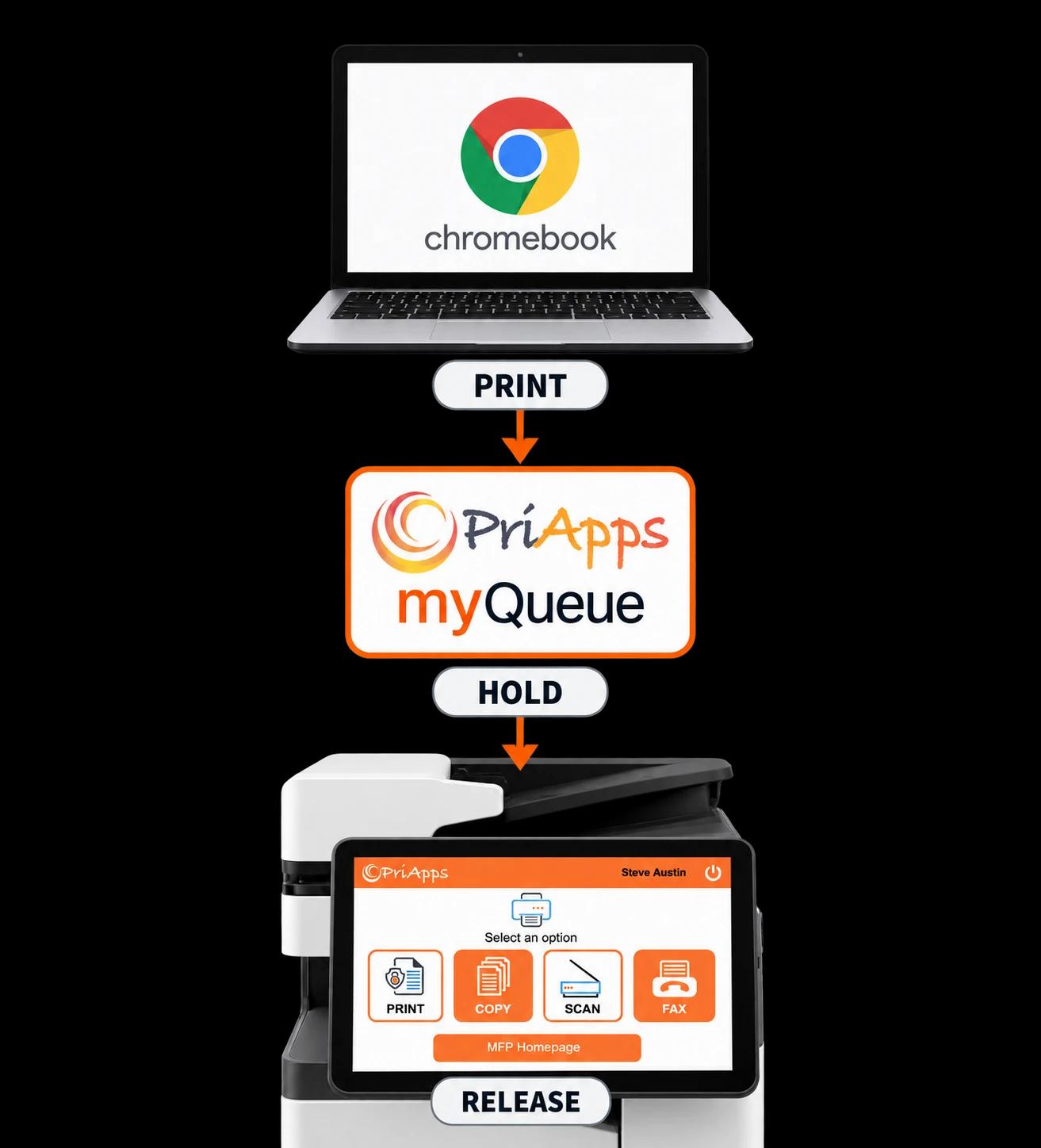
PriApps gives Chromebook users one managed print destination — their PriApps myQueue. Users print as normal, their documents are held securely, and they can release them at a convenient printer or MFP.
No printer drivers to install. No need to configure individual printers on every Chromebook. Every job remains associated with the user and can be tracked and controlled like other printing across the organization.
THE CHALLENGE
Chromebook printing shouldn't mean managing printers Chromebook by Chromebook
ChromeOS makes it straightforward to centrally manage large numbers of devices. Printing can become more difficult when every Chromebook also needs access to printers distributed across an organization.
Configuring individual printers on individual devices adds administration and makes it harder to provide users with a consistent printing experience.
It can also separate Chromebook printing from the controls organizations already apply to other print activity.
PriApps brings Chromebook printing into the same managed print environment as other users and devices.
THE PRIAPPS APPROACH
One extension. One managed print destination.
PriApps provides the PriApps Print Extension for Chrome, available from the Chrome Web Store.
Users print from their Chromebook as normal and select PriApps myQueue as their printer.
Instead of choosing and configuring individual printers, the user sends the document to their personal PriApps queue. The job can then be securely released at a convenient printer or MFP.
There are no printer drivers to install on the Chromebook and no need to configure every printer individually on every device.
CENTRAL DEPLOYMENT
Roll out Chromebook printing centrally
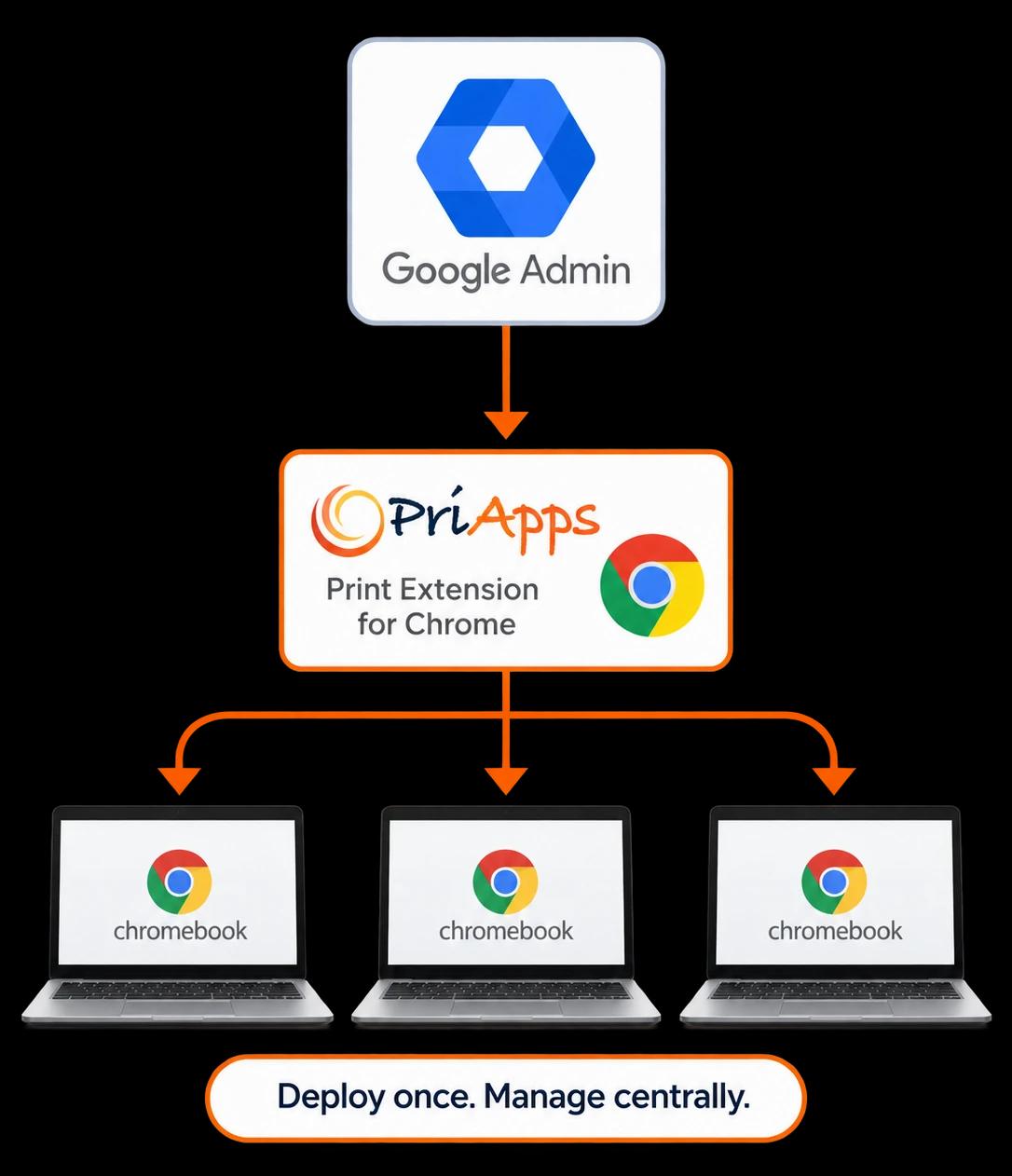
Administrators can deploy the PriApps Print Extension and its PriApps server settings to managed Chromebooks through the Google Admin console.
There is nothing for users to install or configure.
New Chromebooks can therefore be ready to print as part of the organization's normal device enrollment and management process.
USER IDENTITY
The user's Google identity stays with the print job
The PriApps Print Extension automatically identifies the signed-in Google user when their Google ID is registered in PriApps.
There is no separate PriApps sign-in required on the Chromebook.
Every submitted job is therefore associated with an identified user rather than an anonymous device.
Google account details can be brought into PriApps through directory synchronization or added by an administrator.
With PriApps for Google Workspace, users can also sign in at supported MFPs using the same Google identity, providing a consistent identity from Chromebook submission through to document release.
Related solution: Single Sign-On for MFPs →
SECURE RELEASE
Documents stay in the user's queue until they are needed
Chromebook print jobs wait securely in the user's PriApps myQueue alongside documents submitted from their other devices.
The user authenticates at a convenient printer or MFP, sees the documents waiting in their queue, and chooses which ones to release.
PriApps Secure Print Release works across mixed fleets and allows users to release jobs at any make or model of printer or MFP.
Documents that are never collected can expire automatically and be deleted without being printed.
This is particularly useful in environments such as schools, where duplicate, forgotten and unnecessary print jobs can otherwise generate significant waste.
Related solution: Secure Print Release →
HOW IT WORKS
From Chromebook to printed page
Deploy
Administrators deploy the PriApps Print Extension and its settings to managed Chromebooks through Google Admin, or individual users can add the extension from the Chrome Web Store.
The user prints from a Chrome application or web page and selects PriApps myQueue.
Identify & hold
PriApps associates the document with the signed-in Google user and holds it securely in that user's myQueue.
Release
The user authenticates at a printer or MFP and chooses the document or documents they want to print.
Record
PriApps records the print activity against the user for reporting, cost allocation and applicable print-management policies.
MANAGED PRINTING
Manage Chromebook printing like any other print source
Chromebook printing does not need to operate outside the organization's wider print-management strategy.
- PriApps records Chromebook print activity against the user and includes it within the same usage tracking and reporting used for other printing.
- The same Rules-based Printing policies can also apply to Chromebook jobs — for example, encouraging or enforcing mono or duplex printing or routing appropriate jobs to a more economical device.
Students and staff can continue to print what they need, while administrators maintain visibility of usage and cost.
Related solutions: Rules-based Printing · Usage Tracking & Reporting · Quota Management
BUILT FOR EDUCATION
Well suited to large Chromebook environments
Chromebooks are widely used in education, where hundreds or thousands of devices may need to be centrally managed and individual devices may be used by different students throughout the day.
PriApps associates each print job with the Google identity signed into the Chromebook rather than with the Chromebook itself.
The user's document is held in their personal myQueue until that user authenticates and releases it.
This helps schools provide consistent printing across managed Chromebook fleets while maintaining individual accountability for print activity.
PRODUCT AVAILABILITY
Printing from Chromebooks across the PriApps range
Printing from Chromebooks is available with:
PriApps SSO
PriApps Secure Print
PriApps CloudPrint
PriApps for Google Workspace
PriApps for Legal
A PriApps specialist can recommend the product and deployment approach that best fits your Chromebook fleet, printer environment and infrastructure.
RELATED SOLUTIONS
Part of a wider managed print environment
Mobile & BYOD Printing
Let users print securely from smartphones, tablets and personal laptops.
Explore →Secure Print Release
Hold documents securely until the user authenticates and chooses to release them.
Explore →Single Sign-On for MFPs
Allow users to authenticate at supported MFPs and access the functions permitted to them.
Explore →Usage Tracking & Reporting
Understand who is printing, where activity takes place and how printing resources are being used.
Explore →Frequently Asked Questions
How do Chromebooks print with PriApps?
Users print through the PriApps Print Extension for Chrome and select PriApps myQueue. PriApps identifies the signed-in Google user and holds the document in their personal queue until they choose to release it.
Do we need to configure printers on every Chromebook?
No. Chromebooks print to the PriApps myQueue rather than requiring every printer in the fleet to be individually configured on every Chromebook.
Can we deploy PriApps Chromebook printing centrally?
Yes. Administrators can deploy the PriApps Print Extension and its PriApps server settings to managed Chromebooks through the Google Admin console.
Does the user need to sign in to PriApps on the Chromebook?
No. When the user's Google ID is registered with PriApps, the extension identifies the signed-in Google user automatically.
Can the same Google identity be used at the MFP?
Yes. With PriApps for Google Workspace, users can also authenticate at supported MFPs using their Google identity.
Can users release Chromebook jobs at different printers?
Yes. Jobs sent to the PriApps myQueue can be released at a convenient printer or MFP rather than being tied to the printer originally selected when the job was submitted.
Can Chromebook printing be tracked and controlled?
Yes. PriApps records Chromebook jobs against the identified user and includes them in reporting and cost allocation. Rules-based Printing policies can also be applied.
What happened to Google Cloud Print?
Google retired Google Cloud Print at the end of 2020. PriApps provides organizations with a centrally managed way to integrate Chromebook printing with their wider print environment.
Bring Chromebook printing into your managed print environment
Give Chromebook users a simple way to print while giving IT centralized deployment, user-level accountability, secure release and visibility across the printer fleet.