
PRIAPPS SSO
One sign-in at the MFP. Complete control behind it.
PriApps SSO is enterprise print management software built around the user's identity.
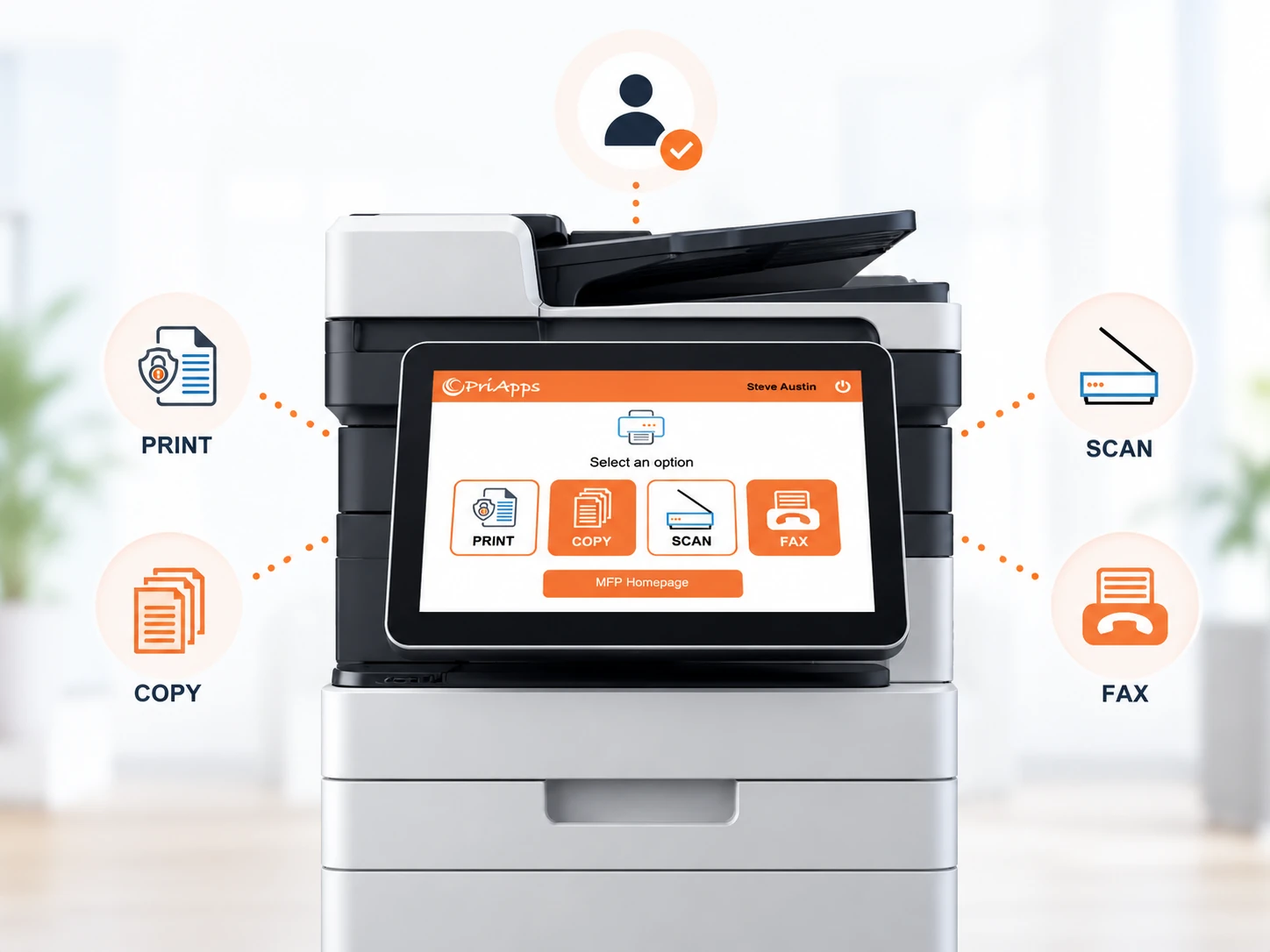
Users sign in once at a supported MFP to access their held print jobs, personalized scan workflows and the copy and fax functions they are authorized to use.
Behind that sign-in, PriApps applies print rules and quotas, protects and manages print jobs, records document activity and connects users to the identity and directory services your organization already manages.
INCLUDED SOLUTIONS
One product. A complete print management platform.
PriApps SSO brings authentication, print management, document capture and usage control together in one product.
Each capability works with the others, using the authenticated user's identity to determine what they can access, how documents are handled and how activity is recorded.
Single Sign-On for MFPs
One authentication for print release, copy, scan and fax, with permission-based access to each function.
Learn more →Secure Print Release
Hold documents securely until the user is ready to release them, with print release available across any make or model of printer or MFP.
Learn more →Scanning & Document Capture
Give users personalized scan workflows to email, folders, cloud services and other destinations based on their identity.
Learn more →Rules-based Printing
Automatically apply policies for color, duplex, device access, routing and other print requirements.
Learn more →Quota Management
Set and manage allowances for print, copy, scan and fax by user, group, account or other criteria.
Learn more →Mobile & BYOD Printing
Enable secure printing from smartphones, tablets and personal laptops without compromising centralized control.
Learn more →Usage Tracking & Reporting
Maintain a detailed record of document activity by user, device, department and other organizational criteria.
Learn more →Printing from Chromebooks
Provide Chromebook users with a centrally managed print destination without having to manage individual device queues.
Learn more →Enterprise Output Management
Manage and track application and server-generated output alongside documents printed directly by users.
Cost Recovery & Billing
Allocate document costs to departments, cost centers, clients, matters or other billing codes.
Learn more →Extending Microsoft Universal Print
Add PriApps secure release, print policies, tracking and device controls to Microsoft Universal Print.
Learn more →SIGN-IN AND IDENTITY
Use the identities you already manage
PriApps SSO links activity at the MFP to the user accounts and identities your organization already maintains.
Users continue to use familiar credentials and authentication methods, while PriApps applies the appropriate permissions, print jobs, workflows and policies after they sign in.
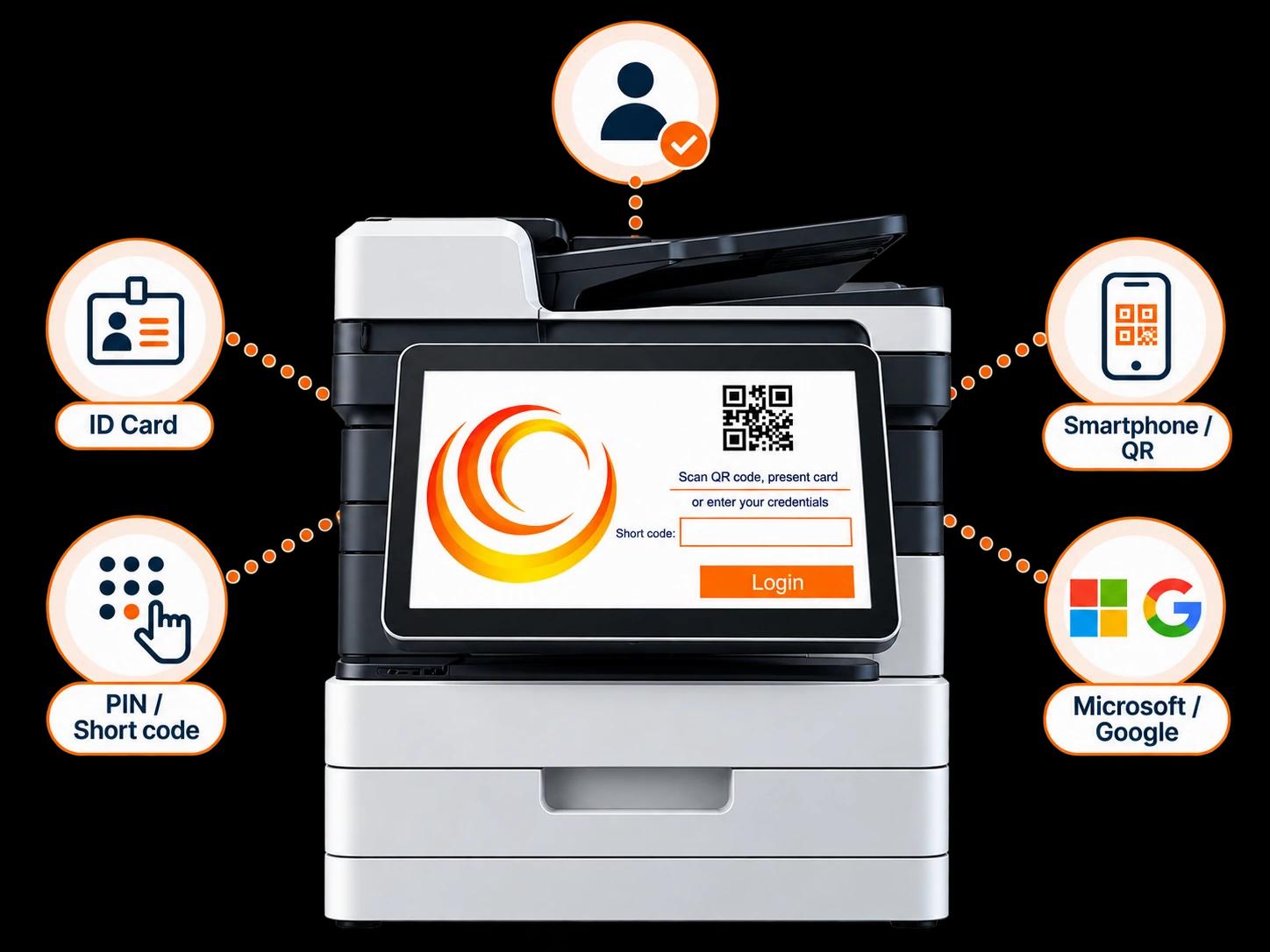
Multiple ways to sign in
Staff ID and door-access badges
Use existing employee cards and access credentials.
Shortcodes and PINs
Provide fast authentication without requiring a physical card.
Network credentials
Allow users to authenticate with their existing network username and password.
Microsoft Entra ID
Connect authentication and user information to your Microsoft identity environment.
Google identity
Support organizations using Google-based identities and directory services.
PriApps Touch-Free
Allow users to authenticate and interact with supported MFPs using their smartphone.
Users can register their own cards
A user can associate an ID card or door-access badge with their account the first time they use an MFP.
This avoids the need for IT to manually enroll every user's card before deployment.
Users and groups stay synchronized
PriApps can synchronize users and groups with LDAP and Active Directory, Microsoft Entra ID, Google's directory and other supported identity and directory services.
Permissions can follow group membership, helping access change automatically when a user's role or organizational membership changes.
AT THE DEVICE
Built for real, mixed fleets
Organizations rarely operate a perfectly standardized printer fleet.
PriApps is designed for environments with different manufacturers, different generations of equipment and different types of printer and MFP.
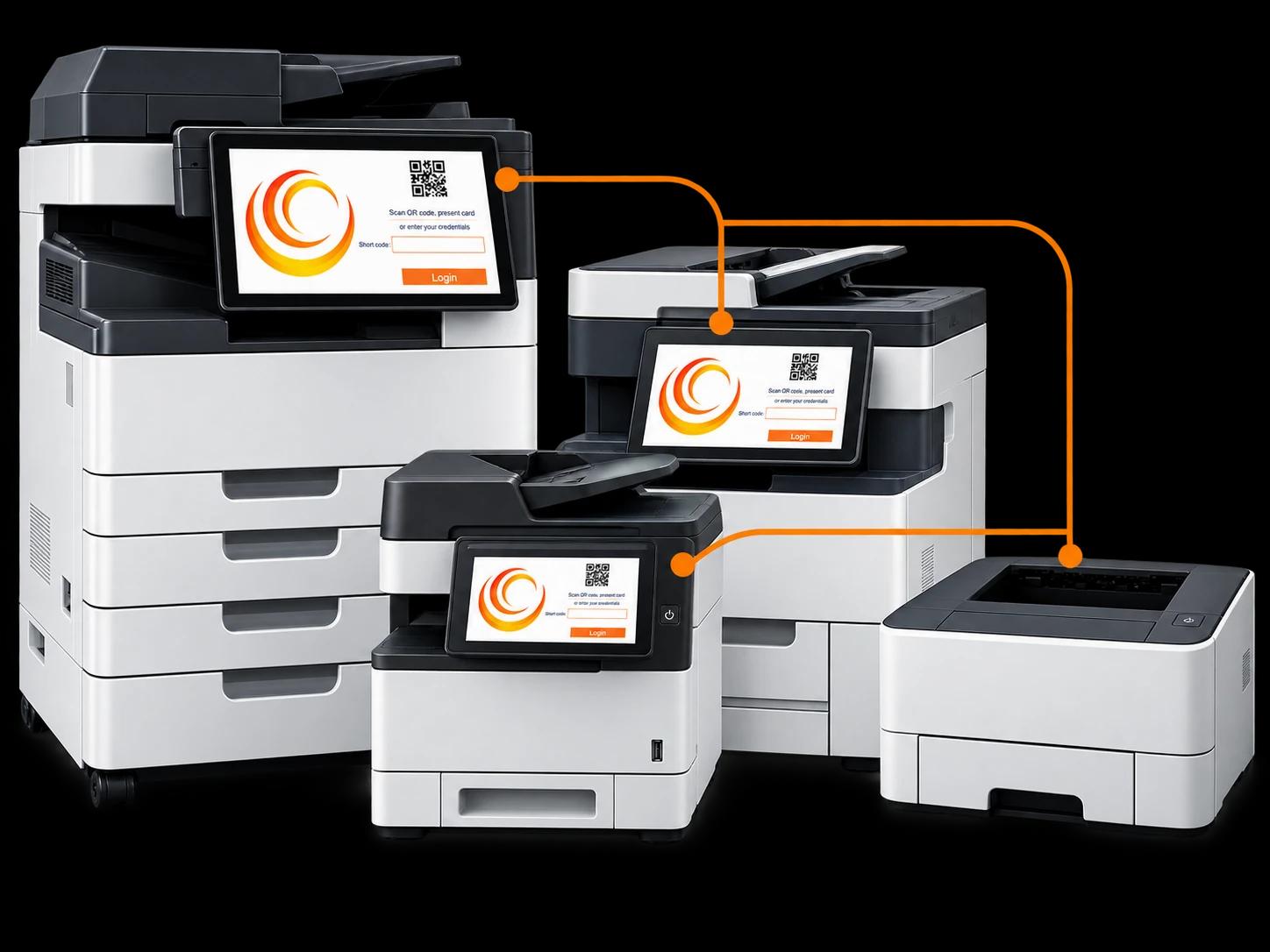
Any make or model
Secure Print Release can be used with any make or model of printer or MFP.
PriApps provides enhanced integration with an increasing range of supported smart printers and MFPs.
A consistent embedded experience
On supported MFPs, the PriApps embedded application provides users with a consistent experience directly from the device control panel.
Users do not need to learn an entirely different print-release process every time they move between supported devices.
More control at release
Before releasing a held job, users can make permitted changes such as adjusting the number of copies or changing color settings.
Print jobs can also be delegated to an assistant or colleague where required.
Support beyond embedded MFPs
Devices do not need an embedded PriApps application to participate in secure print release.
Other release methods can include PriApps Touch-Free and dedicated release stations.
BUILT DIFFERENTLY
Similar features. A very different architecture.
At first glance, enterprise print management products can appear very similar.
Authentication. Secure Print Release. Rules. Quotas. Reporting. Mobile printing.
The important differences are often underneath those features.
PriApps SSO is built on an enterprise scalable output management engine rather than around a traditional print-server architecture. That foundation influences how PriApps manages print jobs, security, resilience, performance and modern printing environments.
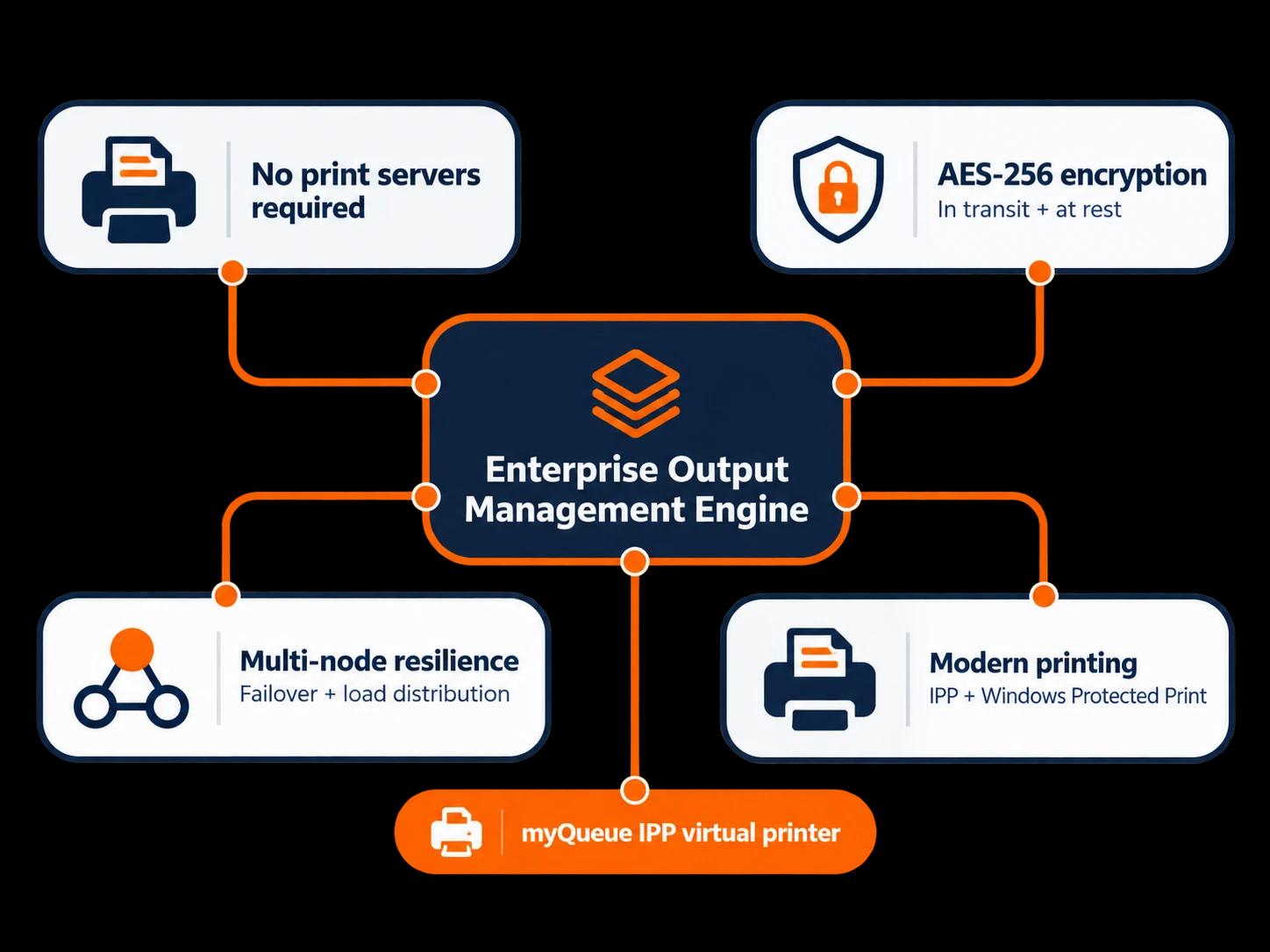
Enterprise output management at its core
PriApps SSO is built on technology designed to manage document output across users, applications, servers, devices and locations.
Print management is therefore part of a broader enterprise output architecture rather than being limited to controlling jobs passing through conventional print servers.
This also enables PriApps to manage application and server-generated output alongside everyday office printing.
Print management without dependence on print servers
PriApps SSO does not require traditional print servers simply to capture and manage users' print jobs.
PriApps myQueue is an IPP-class virtual printer that provides users with a centrally managed print destination while allowing PriApps to manage the job independently of a conventional Windows print-server queue.
This can reduce print-server infrastructure and simplify the move toward more modern printing environments.
Protecting the print job itself
PriApps provides end-to-end protection for print jobs, with AES-256 encryption for jobs in transit and at rest.
Documents can therefore remain protected while they are transferred, stored and held for secure release — not simply when the user authenticates at the MFP.
Multi-node resilience
PriApps SSO can be configured as a multi-server, node-based environment.
Servers can provide failover for one another while also helping distribute workload across the deployment.
For organizations with multiple offices or geographically dispersed users, PriApps nodes can also place services closer to the users and devices that need them, helping maintain responsive performance at remote locations.
Designed for modern printing
PriApps does not have to depend on traditional manufacturer print drivers.
Through myQueue, IPP and support for modern Windows printing technologies, organizations can progressively reduce their reliance on legacy print drivers and print infrastructure.
PriApps also supports Windows Ready Print and Windows protected print mode, helping organizations adopt Microsoft's modern protected printing architecture while retaining centralized print management and control.
Architecture matters
Enterprise output management. Modern printing protocols. Multi-node resilience. AES-256 protection.
The features users see at the MFP may look familiar.
What sits underneath them is very different.
DEPLOYMENT
On-premises or hybrid
Deploy PriApps SSO around your organization's infrastructure, security requirements and operational model.
On-premises
Run PriApps within your own server environment and infrastructure.
Hybrid
Combine PriApps infrastructure with cloud-based identity, services and resources where appropriate.
ON-PREMISES ✓HYBRID ✓CLOUD-NATIVE → PRIAPPS CLOUDPRINT
Looking for cloud-native print management?
PriApps CloudPrint provides MFP authentication, secure print release and document capture without requiring PriApps server infrastructure on-premises.
PriApps for Microsoft 365 and PriApps for Google Workspace are available for on-premises, hybrid and cloud-native deployments.
CHOOSING A PRODUCT
Which PriApps product fits your environment?
PriApps products share many capabilities, but they are designed around different requirements and deployment models.
- Choose PriApps SSO if you need:
- MFP authentication for print, copy, scan and fax, together with Secure Print Release, rules, quotas, personalized scanning and reporting in an on-premises or hybrid environment.
- Choose PriApps Secure Print if you need:
- Secure Print Release, print rules, quotas and reporting without requiring full authentication and function control at the MFP.
- Choose PriApps CloudPrint if you need:
- Cloud-native print management, MFP authentication and document capture without PriApps server infrastructure on-premises.
- Choose PriApps for Microsoft 365 or PriApps for Google Workspace if you need:
- Print management designed around your Microsoft 365 or Google Workspace environment, with on-premises, hybrid and cloud-native deployment options.
- Add PriApps Touch-Free if you need:
- Contactless authentication, print release and supported MFP functions using the user's own smartphone.
Not sure which configuration you need?
Tell us about your printer fleet, identity environment and requirements. A PriApps specialist can help you determine the appropriate PriApps products and deployment model.
WHY PRIAPPS
Print management expertise you can rely on
PriApps combines long-standing print and document management expertise with technology designed for today's mixed fleets, identity environments and distributed organizations.
A pioneer of mobile print release
PriApps developed the first secure print release application for smartphones, helping establish mobile devices as a practical way to securely release printed documents.
Recognized for innovation
PriApps technology has received a BLI Award for Innovation from Buyers Lab, now part of Keypoint Intelligence.
Trusted around the world
More than 20,000 customers worldwide use PriApps technology, supported through a global network of resellers, services partners and office equipment dealers.
Specialists, not a ticket queue
PriApps support is provided by people who understand printers, MFPs, networks, identity and print management infrastructure.
Our objective is not simply to process a support ticket. It is to understand the problem and help get it resolved.
FAQ
PriApps SSO questions
What is PriApps SSO?
PriApps SSO is enterprise print management software built around user identity. It provides authentication at supported MFPs together with Secure Print Release, Personalized Scan Workflows, Rules-based Printing, Quota Management, Mobile & BYOD Printing, Chromebook printing and Usage Tracking & Reporting.
How is PriApps SSO different from PriApps Secure Print?
PriApps Secure Print focuses on secure print release together with print rules, quotas and reporting.
PriApps SSO adds user authentication at supported MFPs, permission-based access to copy, scan and fax, Personalized Scan Workflows and additional identity-driven device functionality.
Does PriApps SSO require print servers?
No. PriApps SSO does not require traditional print servers simply to capture and control users' print jobs.
PriApps myQueue is an IPP-class virtual printer, allowing PriApps to provide a managed print destination without depending on a conventional print-server architecture.
Does PriApps encrypt print jobs?
Yes. PriApps SSO can protect print jobs in transit and at rest using AES-256 encryption, helping protect documents while they are transferred, stored and held for release.
Can PriApps SSO support multiple servers and locations?
Yes. PriApps can be configured using multiple server nodes, providing resilience, load distribution and the ability to place PriApps services closer to users and devices at remote locations.
Does PriApps require traditional print drivers?
Not necessarily. PriApps myQueue uses modern IPP printing and PriApps supports modern Windows printing technologies including Windows Ready Print and Windows protected print mode.
Can PriApps SSO run in the cloud?
PriApps SSO is available for on-premises and hybrid deployments.
For a cloud-native PriApps deployment, PriApps CloudPrint provides MFP authentication, secure print release and document capture without requiring PriApps server infrastructure on-premises.
PriApps for Microsoft 365 and PriApps for Google Workspace also support cloud-native deployment.
Which sign-in methods does PriApps SSO support?
Authentication options include staff ID and door-access badges, shortcodes and PINs, network credentials, Microsoft Entra ID, Google identity services and smartphone authentication using PriApps Touch-Free.
Do we have to enroll every user's access card?
No. Users can register their own ID card or door-access badge at an MFP the first time they use it.
Does PriApps SSO work with mixed printer fleets?
Yes. Secure Print Release works across any make or model of printer or MFP. PriApps provides enhanced embedded integration on supported smart printers and MFPs.
Is Cost Recovery & Billing included?
Cost Recovery & Billing is available as an optional module for organizations that need to allocate document costs to departments, cost centers, clients, matters or other accounts.
SEE PRIAPPS SSO IN YOUR ENVIRONMENT
See what sits behind the sign-in
Tell us about your printer fleet, users, identity environment and infrastructure.
We'll show you how PriApps SSO can provide authentication, print management and document capture across your organization — and how its underlying architecture differs from conventional print management systems.