
Getting started
Architecture overview, system requirements, and pre-installation checklist for PriApps SSO.
Server architecture
PriApps can be deployed as a centralized or distributed on-premises server-based solution, or as a hybrid solution. It does not rely on existing print servers — it has an enterprise-scalable output management engine at its core.
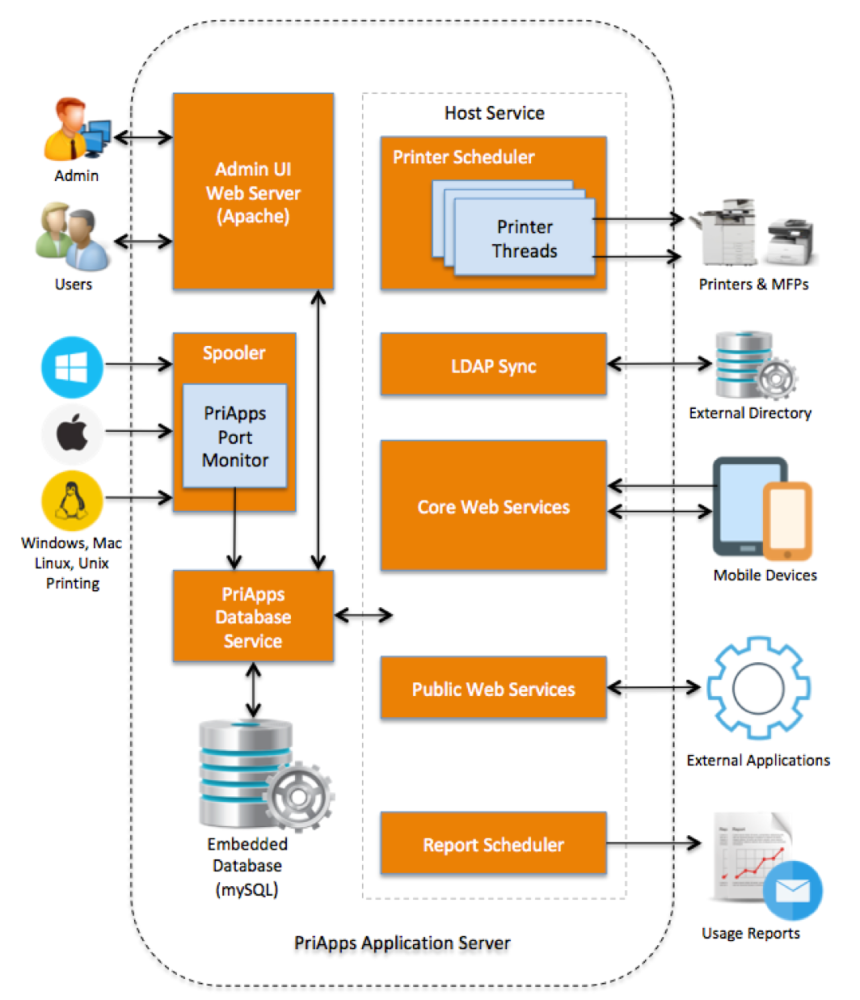
The PriApps Application Server handles authentication, hold queues (myQueue), MFP communication, reporting, and print job processing. For distributed environments, a lightweight PriApps Agent can be deployed on remote sites or individual workstations to capture local print data.
For large or geographically distributed deployments, PriApps recommends a distributed server architecture. Controlling a remote printer over an unreliable WAN link — particularly for SSO and Secure Print Release — is not recommended.
Pre-installation checklist
Before running the installer, confirm the following:
- Target server meets minimum hardware and OS requirements
- All required ports are open on the network firewall
- Server has internet access for license activation
- An administrator-level Windows service account is prepared for the PriApps service
- Manufacturer print drivers are pre-installed on the server with SNMP disabled
- License Token (or Customer ID and email address) is available