myQueue — Advanced Tab
Advanced Hold Queue properties including mobile printing, PJL billing, pre-processing, and printer language support.
v24.0
Configure advanced Hold Queue properties from Managed Printing → Hold Queues in the PriApps Admin UI. Select a Hold Queue and edit its Advanced tab.
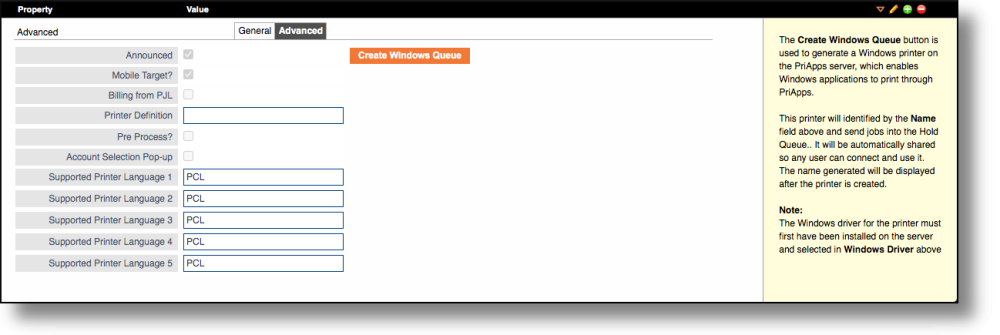
| Field | Description |
|---|---|
| Announced | Indicates that this Hold Queue will be listed by iOS and Mac devices using the Bonjour protocol, making it discoverable for AirPrint. |
| Mobile Target? | Indicates that this Hold Queue should be made available to the PriApps Mobile apps and the Upload page for mobile job submission. |
| Billing from PJL | If checked, this indicates that a driver function to allow the account code to be entered at job submission time is in use. Some manufacturers' drivers support this type of job accounting — the account code is placed in the PJL header of the job. PriApps will extract the code and use it to allocate the job to a Cost Account. The appropriate PJL codes must be present in the Printer Definition XML file for this to work. This option is currently available as standard for Sharp OSA MFPs only. |
| Printer Definition | The pre-defined Printer Definition for this Hold Queue. Only required if Billing from PJL is checked. Printer Definitions specify commands that can be sent to a printer to override settings such as Duplex and Color mode. Select from the dropdown list of available Printer Definitions. |
| Pre Process? | If checked, any mobile jobs submitted to this queue will be rendered into printable format before being added to the queue. |
| Account Selection Pop-up | If checked, the Cost Account Selection UI will appear on the user's workstation or laptop when a job is submitted, provided the PriApps Agent is installed. |
| Supported Printer Language 1–5 | Specifies which types of data streams can be handled directly by printers served by this Hold Queue. Required for mobile printing to determine which document types can be sent directly to the printer and which need to be converted first. |
The PriApps Agent does not automatically display messages for Hold Queues and Managed Printers. The Agent is primarily required for print usage tracking, Rules-based Printing, and Cost Recovery when users print directly to printers and MFPs — not through the Hold Queue.