Advanced Settings
Document analysis, refresh intervals, SNMP, and SmartPIN configuration in Server Settings → Advanced.
v24.0
Configure advanced server behavior from Settings → Advanced in the PriApps Admin UI.
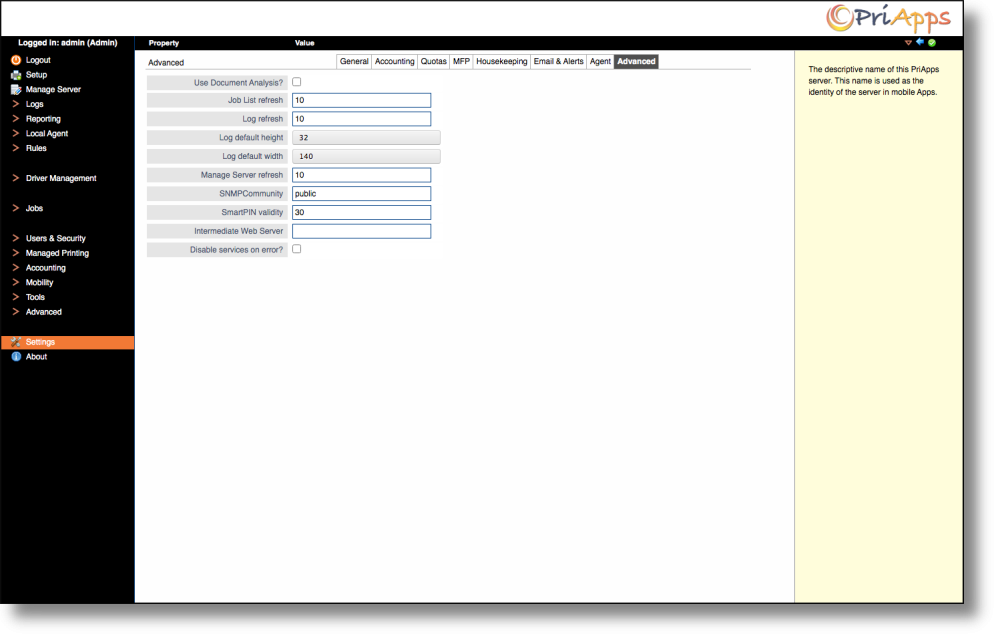
| Setting | Description |
|---|---|
| Use Document Analysis | Select this option to analyze print jobs post-processing in order to improve the accuracy of print usage tracking. |
| Job List Refresh | Specifies the refresh interval (in seconds) for the pending jobs list. |
| Log Refresh | Specifies the refresh interval (in seconds) for logs. |
| Log default height | Specifies the height in lines of a full-screen log display. |
| Log default width | Specifies the default width of a full-screen log display. |
| Manage Server Refresh | Specifies the refresh interval in seconds for the server management screen. |
| SNMPCommunity | Specifies the community name for SNMP read messages used to communicate with printers and MFPs. |
| SmartPIN Validity | Specifies the period of validity of a SmartPIN in seconds. |
| Intermediate Web Server | Specifies the IP Address of a server running a web service for MFPs that require an intermediate web server for communication. |
| Disable services on error? | Select this option to disable PriApps application services and Managed Printers if a fatal error or misconfiguration is detected. |
Enabling Disable services on error will halt printing for all managed devices if a fatal error occurs. Ensure monitoring is in place to detect and respond to service interruptions promptly.