General Settings
Core server identity, localization, and branding options in Server Settings → General.
v24.0
Configure global server behavior from Settings → General in the PriApps Admin UI. The General tab displays configurable settings not covered under any other tab.
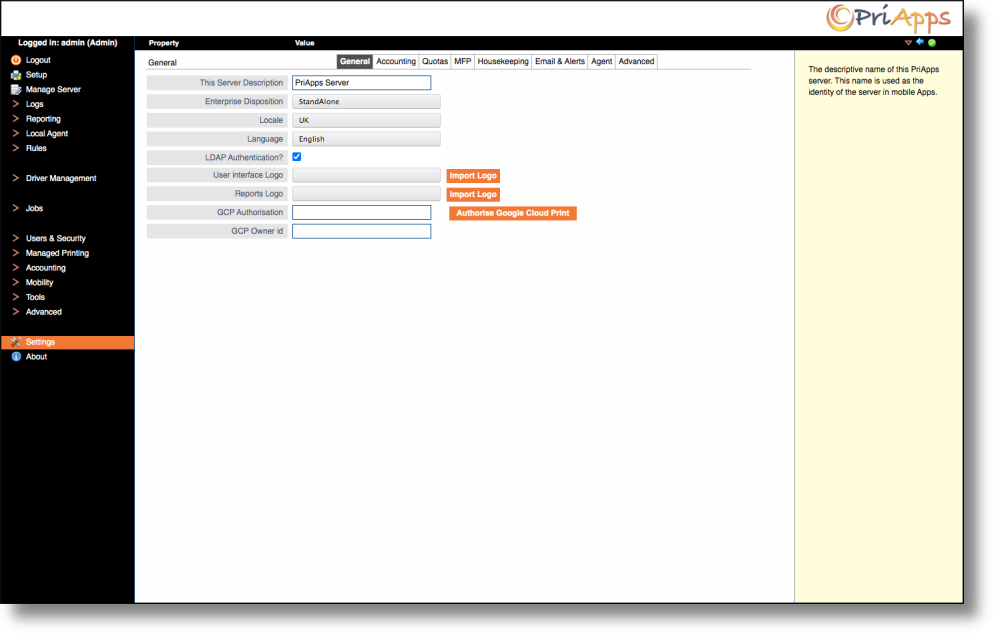
| Setting | Description |
|---|---|
| This Server Description | The display name of this PriApps Application Server. Used to identify the server in reports and the Admin UI. |
| Enterprise Disposition | Specifies the role of this PriApps Application Server in an Enterprise Deployment (e.g. Primary or Secondary). |
| Locale | Defines the geographic location of the PriApps Application Server for localization purposes. Affects language, currency symbol, and date format. |
| Language | The language used across all interfaces provided by this server, including the Admin UI and user-facing screens. |
| LDAP Authentication | If enabled, a user login attempt will be authenticated against the LDAP servers configured in the LDAP Integration section. If more than one LDAP server is configured, all enabled server connections will be tried in sequence until one succeeds or all fail. |
| User Interface Logo | Select an image to appear in the header of all PriApps admin and upload UI screens in place of the PriApps logo. Choose from a dropdown list of uploaded images, or use the Import Image button to upload a new logo. Images must be in PNG or JPEG format. |
| Reports Logo | Select an image to appear in the header of all PriApps-generated reports in place of the PriApps logo. Choose from a dropdown list of uploaded images, or use the Import Image button to upload a new logo. Images must be in PNG or JPEG format. |
| GCP Authorization | The Google authorization code required to publish printers or the PriApps myQueue to a Google Cloud Print account. |
| GCP Owner ID | The Google Cloud Print Owner ID required to publish printers or the PriApps myQueue to a Google Cloud Print account. |
Changes to the Server Description and Locale take effect immediately and do not require a service restart.
Google Cloud Print (GCP) has been deprecated by Google and GCP-related settings are no longer functional.