
Email Settings & Alerts
SMTP configuration and alert routing in Server Settings → Email Settings & Alerts.
Configure email delivery and alert routing from Settings → Email Settings & Alerts in the PriApps Admin UI. The Email & Alerts tab is used to set up the PriApps Application Server as an SMTP client in order to send reports and alerts by email.
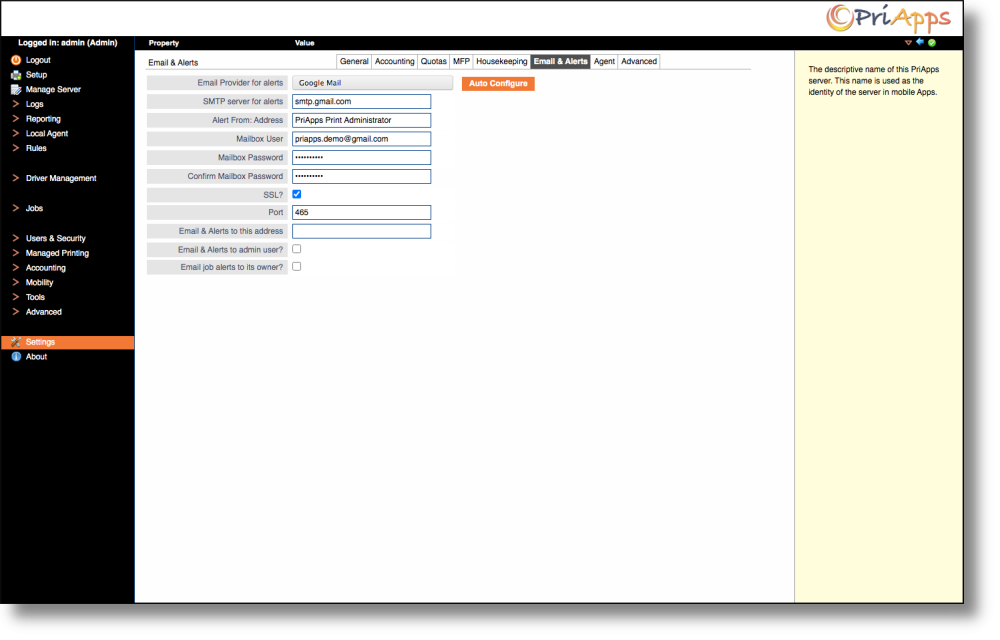
SMTP configuration
Enter your SMTP server details in this tab. Once configured, click the Test SMTP button to verify the connection — a success message confirms that all settings are correct.
An Auto Configure option is available for well-known email providers such as Gmail, which pre-fills the SMTP host, port, and security settings automatically.
Alert settings
| Setting | Description |
|---|---|
| Email alerts to this address | If specified, this email address will receive alert messages in addition to, or instead of, the built-in admin user email address. |
| Email Alerts to Admin User | If checked, alert emails will be sent to the email address of the built-in admin user when certain error conditions occur. These include unscheduled service halts, print data conversion errors, and any error messages sent to users when Send Replies is enabled on a Mailbox. This feature requires a mobility license and a configured mailbox. |
| Email Job Alerts to its Owner | If checked, alert emails are also sent to the owner of the affected print job, where an email address is available for that user. |
Report distribution by email also requires at least one Distribution Group to be configured under Users & Security → Groups.