Housekeeping
Scheduled cleanup tasks, job purging, and server synchronization in Server Settings → Housekeeping.
v24.0
Configure scheduled cleanup tasks from Settings → Housekeeping in the PriApps Admin UI. The Housekeeping dialog is where all scheduled cleanup tasks can be configured.
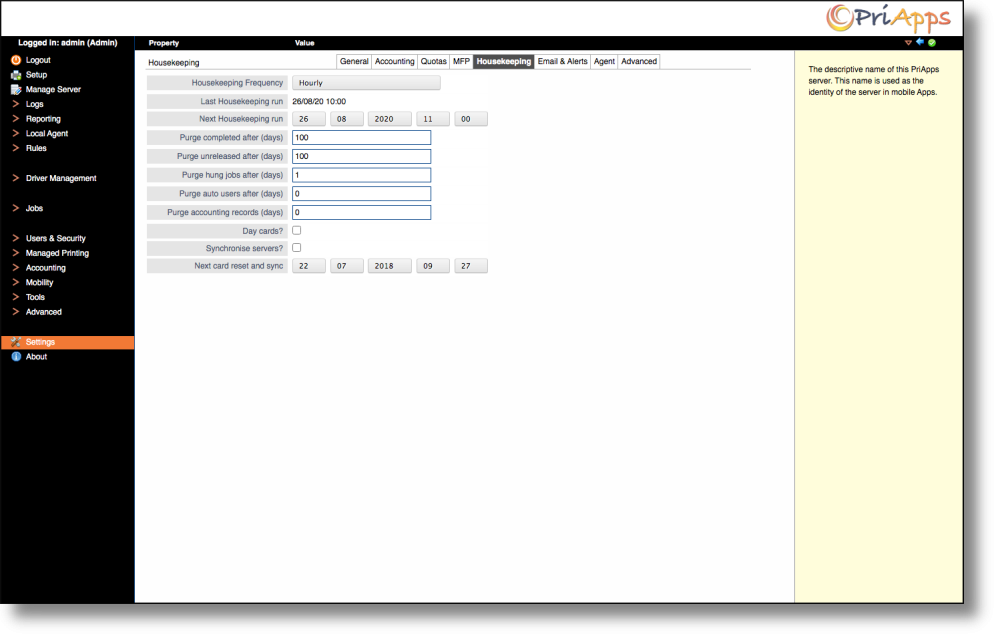
Use these settings to schedule purges of completed jobs, unreleased jobs, hung jobs, and other stale data. Keeping housekeeping tasks active helps the system run faster and more efficiently.
| Setting | Description |
|---|---|
| Housekeeping Frequency | Select the frequency at which Housekeeping tasks run from the dropdown list. |
| Last Housekeeping run | Displays the date and time of the last Housekeeping run. Read-only. |
| Next Housekeeping run | Displays the date and time of the next scheduled Housekeeping run. Administrators can change this date and time manually. |
| Purge Completed after (days) | Specifies the number of days after which all Completed jobs will be purged from the system. Set to 0 to never purge. |
| Purge unreleased after (days) | Specifies the number of days after which all Unreleased jobs will be purged from the system. Set to 0 to never purge. |
| Purge hung after (days) | Specifies the number of days after which all Hung jobs will be purged from the system. Set to 0 to never purge. |
| Purge auto users after (days) | Specifies the number of days after which automatically created users will be purged from the system. Set to 0 to never purge. |
| Purge accounting records (days) | Specifies the number of days after which Accounting Records will be purged from the system. Set to 0 to never purge. |
| Day Cards? | Select this option to purge day cards at the configured housekeeping time. |
| Synchronize Servers | Select this option to synchronize ID Card registration data across multiple PriApps Application Servers. |
| Next card reset and Sync | Displays the date and time of the next synchronization of ID Card / Badge details. Administrators can change this date and time manually. |
Setting a purge value of 0 disables purging for that item type entirely. Ensure purge intervals are configured appropriately for your storage capacity, particularly for environments with high print volumes.