Agent Settings
Global configuration for the PriApps Agent deployed to workstations and laptops.
v24.0
Configure global settings for the PriApps Agent from Settings → Agent Settings in the PriApps Admin UI. The Agent Settings tab is where all global settings can be configured for the PriApps Agent that is deployed to workstations and laptops.
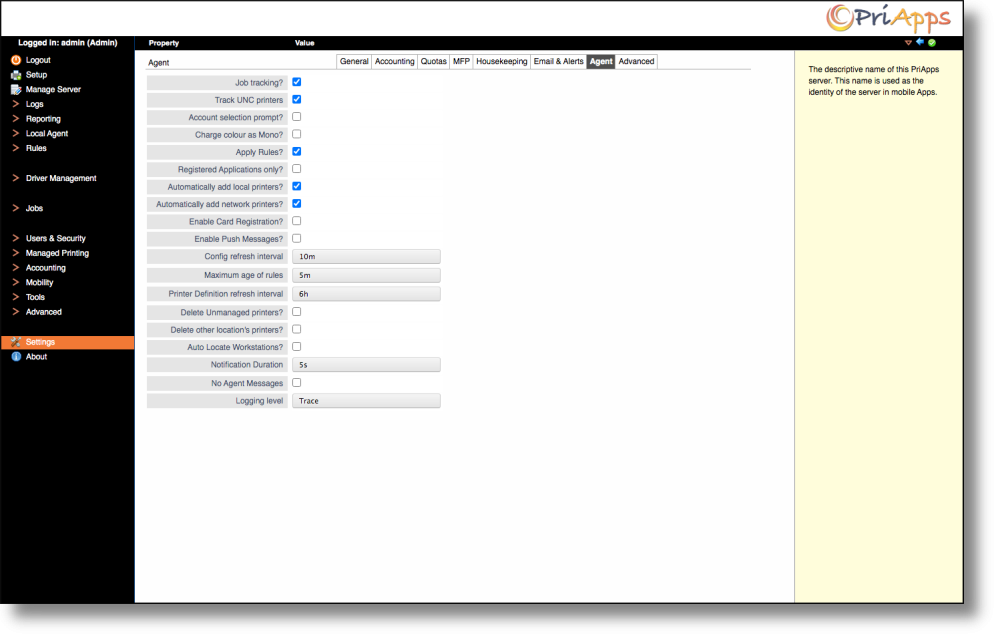
The PriApps Agent is used for:
- Print usage tracking
- Rules-based printing notifications
- Assigning Cost Accounts to print jobs
- Centralized printer and driver management and deployment
Tracking and rules
| Setting | Description |
|---|---|
| Job Tracking? | Select this option if print tracking is desired for the PriApps Agent. |
| Track UNC printers | Select this option if print tracking of UNC printers is required. |
| Account Selection Prompt? | Select this option if a Cost Account selection prompt is required for each print job on all computers that have a PriApps Agent running. |
| Charge color as mono | Select this option if all color print jobs should be charged as mono on all computers that have a PriApps Agent running. |
| Apply Rules? | Select this option if Rules-based printing should be applied on all computers that have a PriApps Agent running. |
| Registered Applications only? | Select this option to only track print usage on applications that are registered in the PriApps system. |
Printer management
| Setting | Description |
|---|---|
| Automatically Add Local Printers | Select this option to add USB-attached (local) printers not already configured within PriApps on all computers that have a PriApps Agent running. |
| Automatically Add network Printers | Select this option to add network printers not already configured within PriApps on all computers that have a PriApps Agent running. |
| Delete Unmanaged Printers | Select this option to delete unmanaged printers on a user's computer running the PriApps Agent for Driver Management. |
| Delete other location's Printers? | Select this option to delete printers from other locations on a user's computer running the PriApps Agent for Driver Management, when the user changes location. |
| Auto Locate Workstations | Select this option to automatically locate computers running the PriApps Agent for Driver Management. Once located, the print drivers for available printers at that location will be automatically downloaded. |
Authentication
| Setting | Description |
|---|---|
| Enable Card Registration | Select this option to allow users to register an ID card or Badge on a computer running the PriApps Agent. A supported USB Card Reader is required. |
Notifications and intervals
| Setting | Description |
|---|---|
| Enable Push Messages | Select this option to allow the PriApps Agent to display messages and notifications pushed from a PriApps Application Server. |
| Config Refresh Interval | Specifies the time interval between refreshes of the PriApps Agent configuration. The PriApps Agent initiates refreshes. |
| Maximum Age of Rules | Specifies the amount of time before the PriApps Agent checks the PriApps Application Server for any changes, additions, or deletions of print rules or policies. |
| Printer Definition Refresh Interval | Specifies the time interval between refreshes of the printer definitions for Driver Management. The PriApps Agent initiates refreshes. |
| Notification Duration | Specifies the duration of messages and notifications displayed on a user's computer running the PriApps Agent. |
| No Agent Messages | Select this option to ensure that no messages or notifications appear on a user's computer running the PriApps Agent. |
| Logging Level | Specifies the logging level for the PriApps Agent. |